

Most AI integrations in automation platforms work the same way: send a prompt to a large language model, wait several seconds, parse the text response, hope it matches what you expected. The result is slow, expensive, and brittle. A single GPT call in a Podio workflow can burn through hundreds of tokens and take five to ten seconds. Do that across a hundred items and you're looking at real money and real latency.
We just shipped something different.
ProcFu now integrates TypeSafe JEV, the first "System One" AI model. JEV doesn't generate text. It makes typed decisions: yes/no judgments, categorical choices, numeric scores. Every response is structured, constrained, and fast. A JEV call completes in roughly 100 milliseconds. Compare that to the 5-10 seconds you'd wait for a GPT response doing the same classification work.
What JEV actually does
Three primitives. That's the entire surface area.
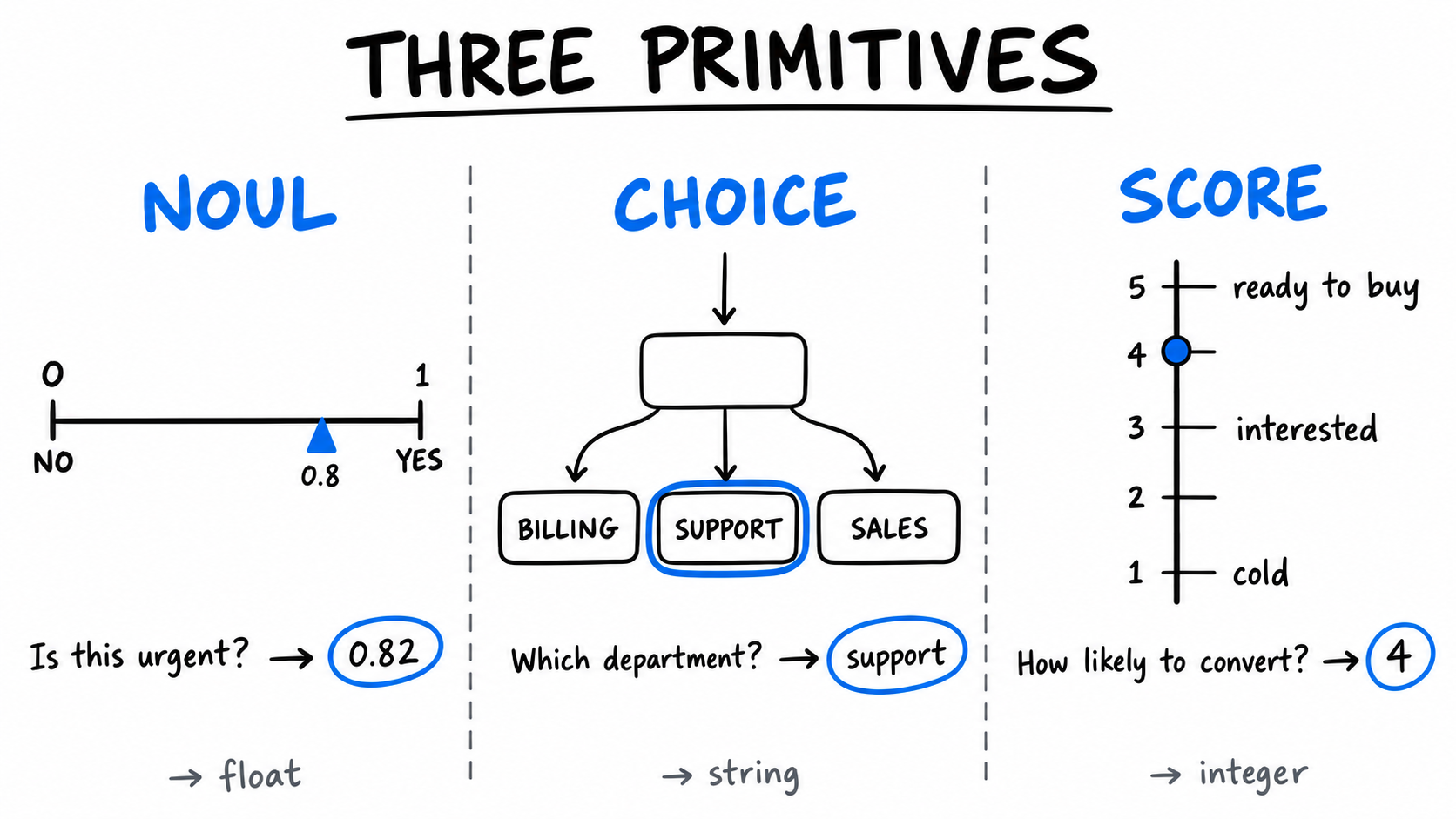
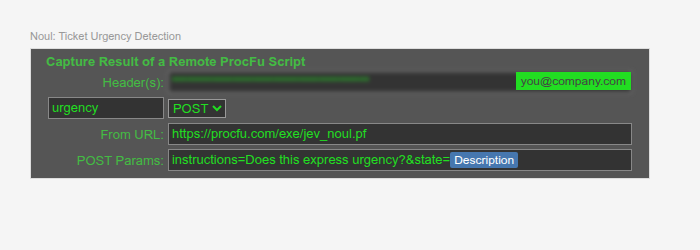
Noul answers yes-or-no questions. It returns a float between 0 and 1. Near 1 means strong yes. Near 0 means strong no. Around 0.5 means the model is uncertain. You use it like a sensor: "Does this message express urgency?" "Does this text contain personal information?" "Is this a duplicate of the previous request?"
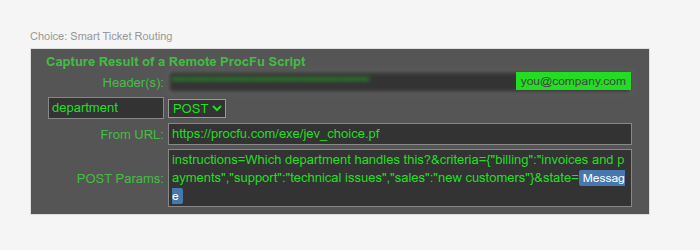
Choice picks from a set of labeled options you define. You give it categories with descriptions. It returns the label. "Which department handles this ticket?" comes back as billing or support or sales. No parsing. No regex. No hoping the LLM spelled it right.
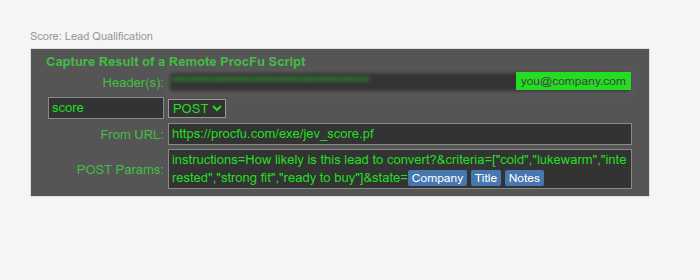
Score rates content on a numeric spectrum. You define 2-10 levels with descriptions. It returns the score. Lead qualification, content quality, severity assessment. The number goes straight into your field or your conditional logic.
Every call costs 1 action. Flat. A comparable GPT call typically costs 4-20 actions depending on your plan tier and the token count. JEV is cheaper because it is cheaper: TypeSafe prices JEV at $42 per billion input tokens, roughly 238x less than frontier LLMs.
Where you'd use this
Ticket triage. A new support ticket arrives. One JEV call classifies the department. Another scores severity. A third checks for urgency. Three calls, three actions, under half a second. The ticket is routed, prioritized, and escalated before the submitter closes the browser tab. Doing this with GPT would cost 4-20 actions and take 15-30 seconds.
Lead scoring. A new lead hits your CRM. JEV scores conversion likelihood on a five-point scale using company, title, and notes as input. Hot leads get immediate task assignments. Cold leads get tagged for nurture. The sales team sees a score, not a wall of AI-generated text they need to interpret.
Data quality gates. A Mini App form collects free-text input. Before the record saves, a code event runs a Noul check: "Does this contain personally identifiable information?" If the confidence exceeds 0.6, the submission is blocked with a warning. The user never leaves the form. The check runs in 100ms. No round-trip to a chat model.
Content moderation. User-submitted content passes through a Noul before it reaches Podio. "Is this spam?" "Does this contain profanity?" "Is this off-topic?" Each question returns a probability you can threshold however you like. Stack three Nouls and you have a moderation pipeline that runs in 300ms for 3 actions.
How it looks in practice
JEV works everywhere ProcScript runs: automation flows, Mini App code events, and standalone scripts. Three functions: jev_noul(), jev_choice(), jev_score().
A ticket urgency check in a flow:
// check urgency on new tickets
$urgency = jev_noul("Does this express urgency?", $payload["item_fields"]["description"]);
if ($urgency > 0.7) {
    podio_item_update($payload["item_id"], {"priority": "Urgent"});
}
Smart routing with Choice:
// route to the right department
$criteria = {"billing":"invoices and payments","support":"technical issues","sales":"new accounts"};
$dept = jev_choice("Which department handles this?", $criteria, $payload["item_fields"]["message"]);
podio_item_update($payload["item_id"], {"department": $dept});
Lead scoring with Score:
// score the lead on a 5-point scale
$levels = ["cold - no fit","lukewarm","interested","strong fit","ready to buy"];
$score = jev_score("How likely is this lead to convert?", $levels, $lead_info);
podio_item_update($item_id, {"lead-score": $score});
In PWA, each of these is a single brick. Here's what they look like:
The detail flag
By default, each function returns the simplest useful value: a float, a string, or a number. If you need the full picture, pass true as the last argument. You get back a JSON object with probability distributions and confidence scores. Useful for audit trails, for logging, or for building compound logic where you threshold on confidence rather than the raw answer.
// get the full breakdown
$result = jev_noul("Is this a complaint?", $text, true);
$decoded = json_decode($result, true);
$confidence = $decoded["noul"];
// log it
account_logger_log("Complaint check: " + $result);
The economics
A medium-complexity GPT call uses roughly 500-2000 tokens. On a Silver plan, that's 1-3 actions per call. On Bronze, it's 1-2. JEV is a flat 1 action regardless of input size. The savings compound on volume.
Run 1,000 ticket classifications per month:
| GPT (est.) | JEV | |
|---|---|---|
| Actions | 2,000-6,000 | 1,000 |
| Latency per call | 5-10s | ~0.1s |
| Total processing time | 1.4-2.8 hours | 1.7 minutes |
| Structured output | Parse and hope | Guaranteed |
The latency gap matters more than the cost gap. In a flow that processes items in a loop, 10 seconds per GPT call turns a 100-item batch into a 17-minute job. The same batch through JEV finishes in 10 seconds.
Getting started
JEV is available now on all Premium plans. No setup required. No API key to configure. The functions jev_noul(), jev_choice(), and jev_score() are ready to call in any ProcScript context.
Start with a single Noul. Pick a yes/no question your workflows answer today with string matching or manual triage. Replace it with one line of code. See what 100 milliseconds feels like.