
Most Podio automations react to something that just happened: an item was created, a status changed, a comment was added. Plenty of business rules have nothing to react to. A contract ends in 30 days. A task was due yesterday. A deal has sat in "Proposal sent" for two weeks. Nobody touched these items, so no event fires.
Rules like these need something that runs on a clock, looks at your data, and decides what to do. In ProcFu that is an Automation Flow with the On Schedule trigger.
This post builds three scheduled rules on one example app:
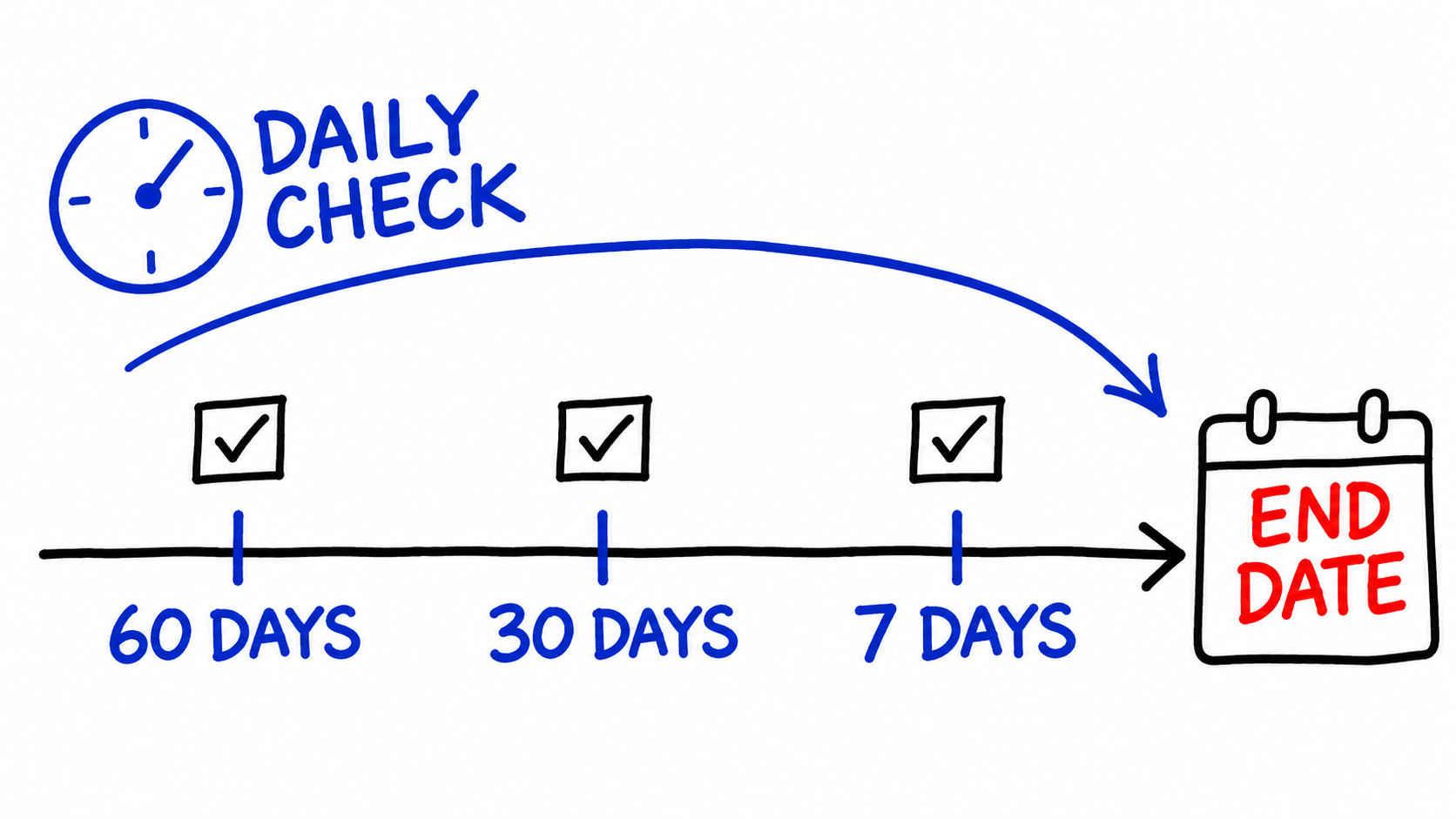
- Renewal reminders 60, 30 and 7 days before an end date
- Escalation when a renewal task goes overdue
- Alerts for items stuck in the same status
Event triggers and schedule triggers
ProcFu Automation Flows have four triggers: On Create, On Update, On Delete and On Schedule. The first three run when Podio sends ProcFu a webhook for an item. ProcFu registers those webhooks automatically when you add an app under Flows.
On Schedule flows have no triggering item. You choose a Day (Every Day, or one weekday) and an Hour (Every Hour, or 0:00 to 23:00), evaluated in your account's timezone. ProcFu checks schedules hourly and queues matching flows to run in the background. The flow's $payload still contains app_id, but item_id is 0, so the flow has to go and fetch the items it cares about.
If you already run Podio Workflow Automation (PWA, formerly GlobiFlow), you can keep your event-driven flows there. The patterns below keep the time-based logic in one ProcFu flow, where the date arithmetic is plain code you can test.
The example app
A service business tracks client contracts in a Podio app called Renewals. One item per agreement, with these fields (external IDs in brackets):
| Field | Type | Purpose |
|---|---|---|
Client (client) |
Relationship | Link to the Contacts app |
End date (end-date) |
Date | When the contract ends |
Account owner (account-owner) |
Contact | Who gets the tasks |
Status (status) |
Category | Active, At risk, Renewed, Churned |
Reminder sent (reminder-sent) |
Category | 60, 30, 7 |
Status changed (status-changed) |
Date | Set by automation |
Two of these fields exist only for the automation. Reminder sent records which reminder has gone out, so the daily flow never creates the same task twice. Status changed records when the status last moved, which Podio does not expose as a simple field.
Use real date fields for anything time-based. A date typed into a text field can't be compared reliably.
Rule 1: Reminders 60, 30 and 7 days before the end date
Create a flow on the Renewals app, set the trigger to On Schedule, Day Every Day, Hour 7:00. New flows open in the visual Flow Builder; this one uses "Switch to Code" because the date maths is easier to read as ProcScript. With the code pasted in, the flow settings look like this:
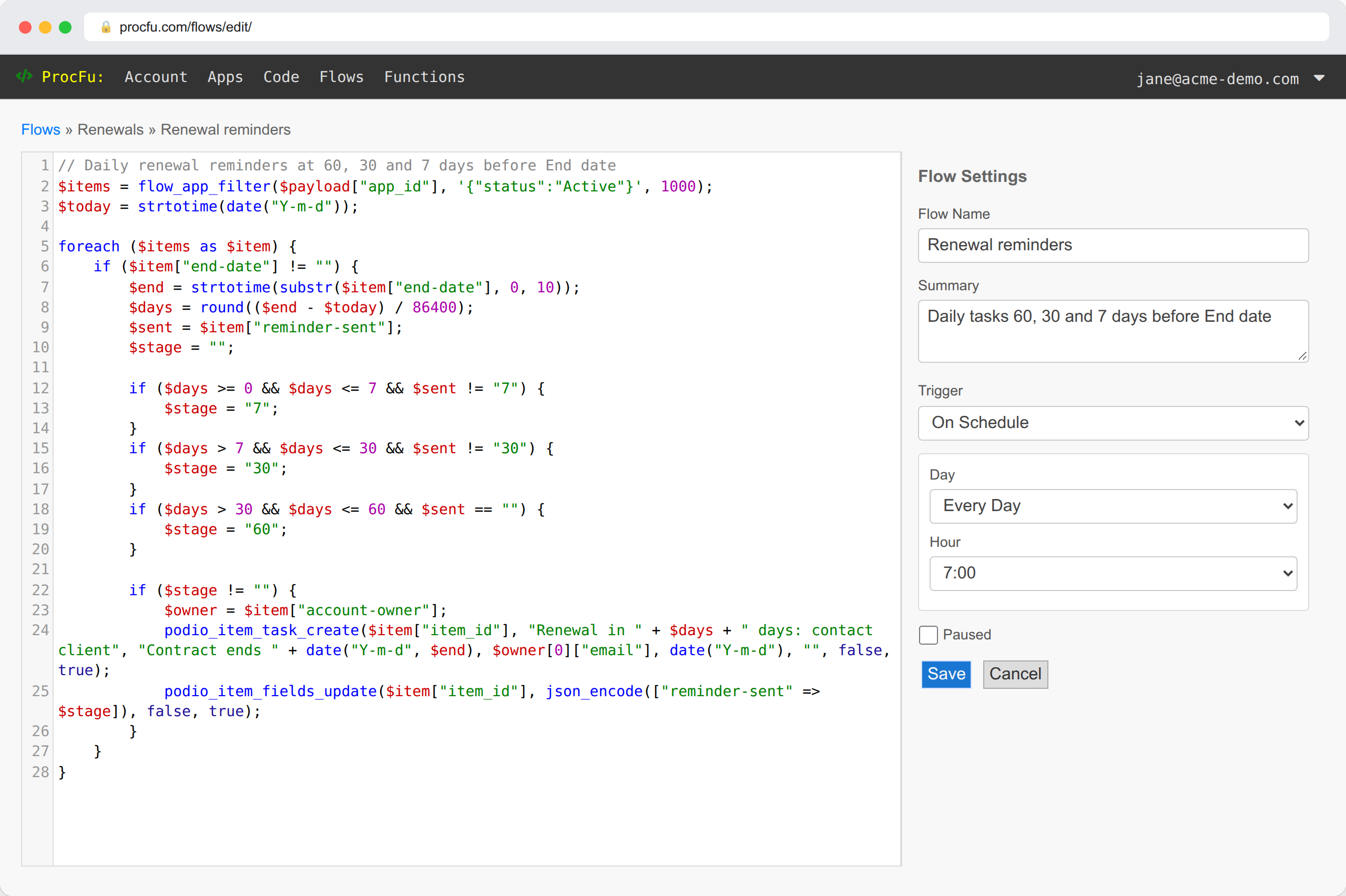
// Daily renewal reminders at 60, 30 and 7 days before End date
$items = flow_app_filter($payload["app_id"], '{"status":"Active"}', 1000);
$today = strtotime(date("Y-m-d"));

foreach ($items as $item) {
    if ($item["end-date"] != "") {
        $end = strtotime(substr($item["end-date"], 0, 10));
        $days = round(($end - $today) / 86400);
        $sent = $item["reminder-sent"];
        $stage = "";

        if ($days >= 0 && $days <= 7 && $sent != "7") {
            $stage = "7";
        }
        if ($days > 7 && $days <= 30 && $sent != "30") {
            $stage = "30";
        }
        if ($days > 30 && $days <= 60 && $sent == "") {
            $stage = "60";
        }

        if ($stage != "") {
            $owner = $item["account-owner"];
            podio_item_task_create($item["item_id"], "Renewal in " + $days + " days: contact client", "Contract ends " + date("Y-m-d", $end), $owner[0]["email"], date("Y-m-d"), "", false, true);
            podio_item_fields_update($item["item_id"], json_encode(["reminder-sent" => $stage]), false, true);
        }
    }
}
What each part does:
flow_app_filter()returns Active items in the simplified flow format. Category values can be given as text, and the limit goes up to 1,000 items per call.- In that format a date field comes back as
YYYY-MM-DD(or with a time), and a contact field comes back as an array of{user_id, name, email}. That is why the owner's email is$owner[0]["email"]. - The windows are ranges, not exact days. If the flow misses a day, the 30-day reminder still goes out on day 29.
podio_item_task_create()takes the assignee as an email address. The due date here is today, because the task is "do this now".- Writing Reminder sent with
$hookset tofalsestops the update from firing webhooks, so your On Update flows don't run for a housekeeping change.
When a contract is renewed, clear Reminder sent and set the new end date, and the cycle starts again. A small On Update flow can do that when Status changes to Renewed.
The same logic can be built visually: Get Podio View, For Each, Set Variable for the day count, If, then Assign Task and Update Item. The builder's Assign Task brick offers relative due dates such as today or +3 days.
Rule 2: Escalate overdue renewal tasks
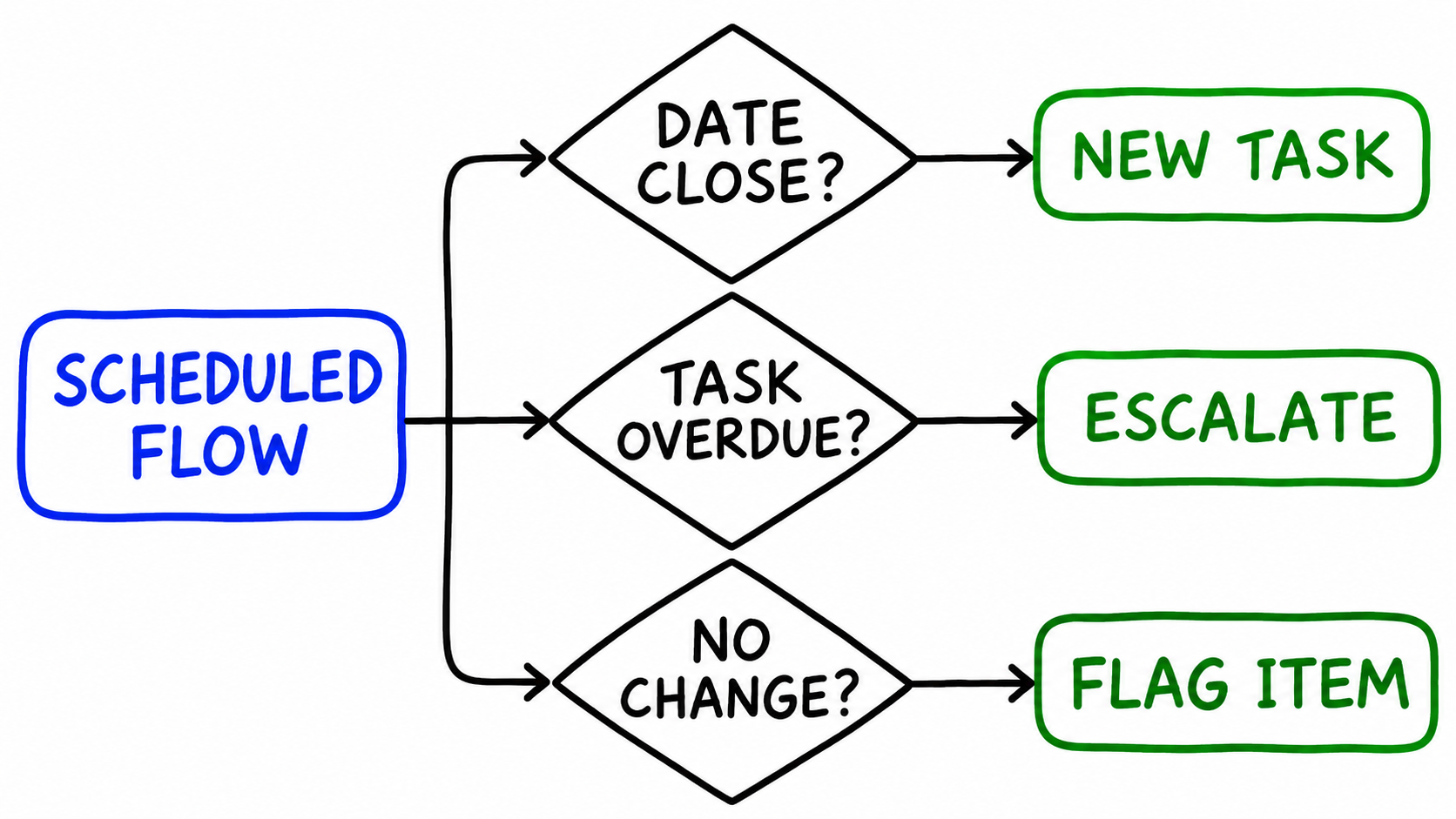
A reminder task that sits overdue is a sign the renewal is in trouble. This flow runs once a day, finds open tasks past their due date, moves the item to At risk, and gives the sales manager a task.
// Escalate Active renewals that have an overdue open task
$items = flow_app_filter($payload["app_id"], '{"status":"Active"}', 1000);
$today = date("Y-m-d");

foreach ($items as $item) {
    $tasks = podio_item_tasks_get($item["item_id"], true);
    $overdue = 0;
    foreach ($tasks as $task) {
        if ($task["due_date"] != "" && $task["due_date"] < $today) {
            $overdue = $overdue + 1;
        }
    }

    if ($overdue > 0) {
        podio_item_fields_update($item["item_id"], json_encode(["status" => "At risk", "status-changed" => $today]), false, true);
        podio_item_task_create($item["item_id"], "Overdue renewal follow-up", "The account owner has " + $overdue + " overdue task(s) on this renewal.", "manager@example.com", $today, "", false, true);
    }
}
podio_item_tasks_get() with true returns only open tasks. Dates in YYYY-MM-DD format compare correctly as strings, so no conversion is needed.
Because the flow only looks at Active items and sets the status to At risk, each renewal escalates once. It also writes Status changed itself: with $hook set to false, the update doesn't fire webhooks, so the stamp flow in Rule 3 wouldn't run for this change. Your team moves it back to Active (or to Renewed) once the client has been contacted.
This rule makes one Podio API call per item. For an app with a few hundred active items that is fine once a day. For larger apps, point the flow at a Podio view that only contains items ending in the next few months, using flow_view_fetch() instead of flow_app_filter().
Rule 3: Flag items stuck in one status
Podio records when an item was last edited, but any edit counts, including a typo fix. What you usually want to know is how long an item has been in its current status. Record that yourself with a regular On Update flow:
// Stamp the date whenever Status changes
if (isset($payload["item_changes"]["status"])) {
    podio_item_fields_update($payload["item_id"], json_encode(["status-changed" => date("Y-m-d")]), false, true);
}
On Update flows receive item_changes, keyed by field external ID with the from and to values, so the flow only writes when Status itself moved. Again $hook is false, so this update does not trigger the flow a second time.
The scheduled part then checks the stamp. This version runs on Monday at 8:00 and posts a comment on anything At risk that hasn't moved for 14 days:
// Weekly: comment on items stuck in At risk for 14+ days
$items = flow_app_filter($payload["app_id"], '{"status":"At risk"}', 1000);
$cutoff = date("Y-m-d", strtotime("-14 days"));

foreach ($items as $item) {
    $changed = substr($item["status-changed"], 0, 10);
    if ($changed != "" && $changed < $cutoff) {
        podio_comment_create($item["item_id"], "This renewal has been At risk since " + $changed + ". Decide: renew, renegotiate or mark Churned.", false, false);
    }
}
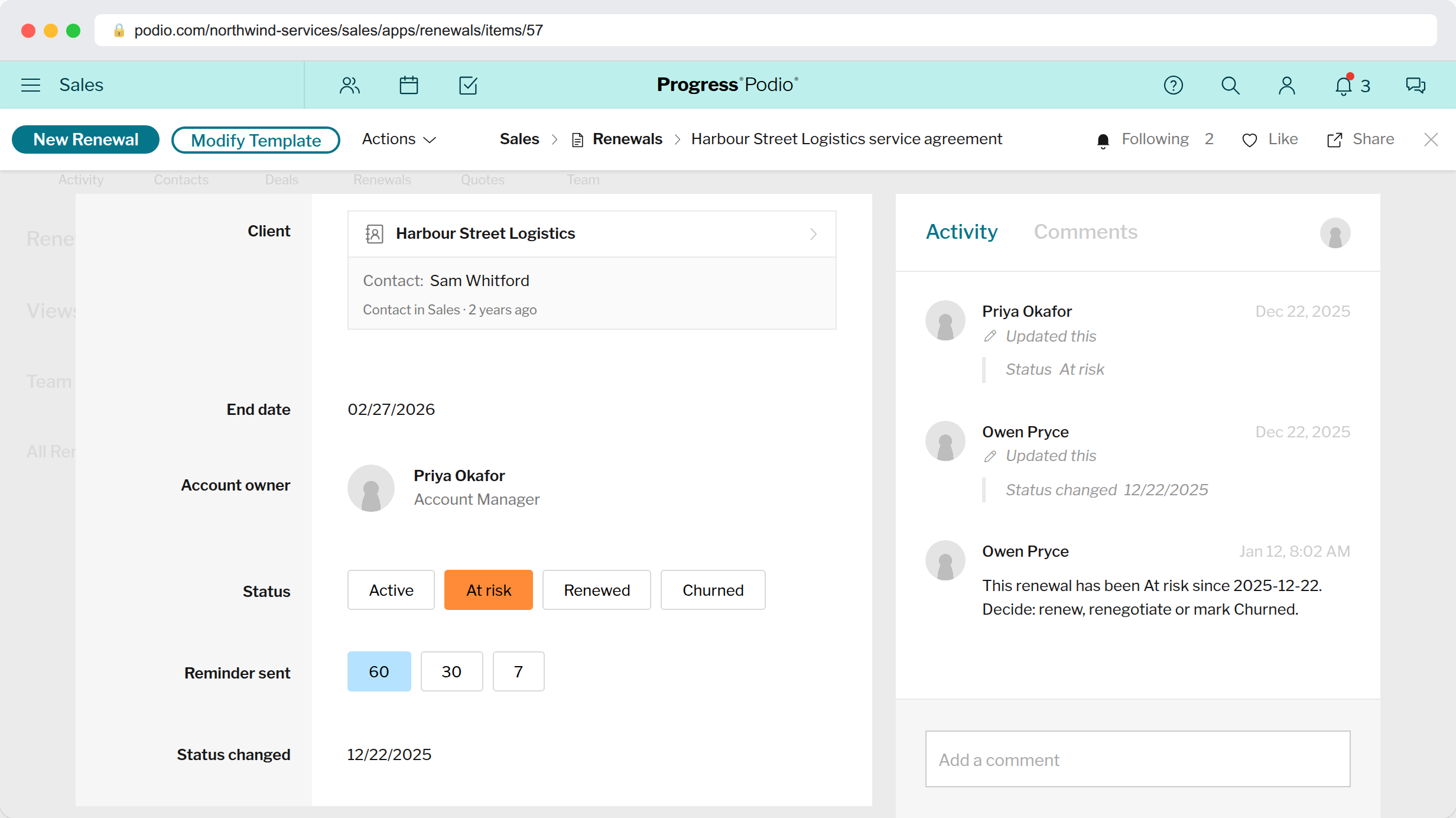
On a stuck renewal, the result looks like this. The status change, the date stamp and the weekly comment all sit in the item's activity:
The same pattern works for any app with a status field. In a Deals app, stamp the date when Stage changes and flag deals that have sat in "Proposal sent" too long. In a Jobs app, flag jobs waiting on "Ready for review".
Keep the threshold high enough that alerts are rare. If an owner gets a stuck-item comment every week on half their items, they will stop reading them, and the threshold is wrong for that process.
Testing scheduled flows
You don't need to wait a day to see whether a scheduled flow works:
- Run on Item in the flow editor runs the flow straight away. For a scheduled flow, the code ignores the item and fetches its own list.
- The flow Logs record each run, its execution time and any errors.
- Start with a test item whose end date is 25 days away and Reminder sent set to 60. One run should create exactly one 30-day task and set Reminder sent to 30. A second run should do nothing.
That second run is the check that matters most. A time-based rule runs every day for months, so it has to be safe to run again on the same data.
Where else this fits
The three rules share one shape: fetch the items that could be affected, compare a date against today, act, and write back a marker so the next run knows what has been done. Once you have that shape, other rules follow from it:
- Invoice items with a due date in the past and a status of Unpaid get a reminder task for accounts.
- Service jobs scheduled for tomorrow get a preparation task for the assigned technician.
- Leads with no Status change in 10 days get a follow-up task for the owner.
For scripts that aren't tied to one Podio app, such as a nightly job that reads several apps or calls an outside API, ProcFu also runs ProcScript as Cron Jobs from your account settings.