
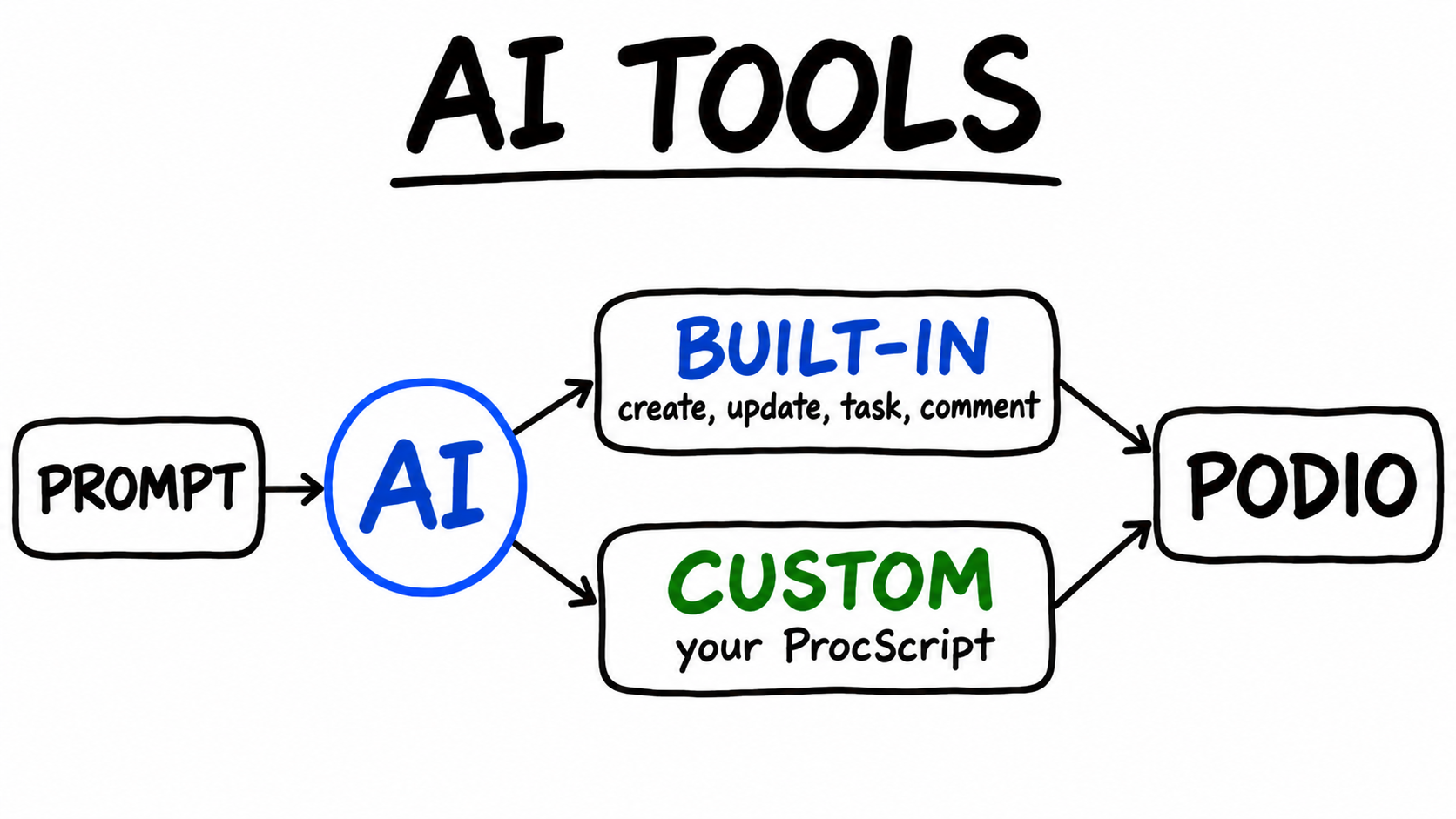
ProcFu's AI functions read a Podio item, including its fields, comments, related items and some attached files, and answer a prompt about it. On their own they can only reply with text. If you want the AI to create a follow-up task or update a status field, you have to parse that text yourself and make the change in a separate step.
AI Tools close that gap. A tool is a function the AI model can call while it works out its answer. ProcFu has two kinds:
- Built-in tools: six ready-made Podio write operations you switch on by name.
- Custom tools: ProcScript blocks you write yourself, which can do anything ProcScript can do.
Both work with the podio_ai_ask_general and podio_ai_ask_trained functions, and with the AI assistant inside Podio (the "AI by Procfu" user you @mention or assign tasks to).
Built-in tools
These cover the common Podio write operations:
| Name | What the AI can do |
|---|---|
create |
Create an item in a Podio app |
update |
Update fields on an existing item |
delete |
Permanently delete an item |
task |
Create a task on an item and assign it |
comment |
Comment on an item or a task |
file |
Attach a Markdown text file to an item |
In a script you turn them on with the builtin_tools parameter, either as a comma-separated list such as task,comment or as all. The parameters of podio_ai_ask_general are:
| Parameter | Value |
|---|---|
prompt |
What you want the AI to do |
item_id |
Podio item to include as context (optional) |
app_id |
Podio app to include, requires a Data Sync (optional) |
custom_tools |
Comma-separated ProcScript block names (optional) |
builtin_tools |
Comma-separated built-in tool names, or all (optional) |
podio_ai_ask_trained takes the same tool parameters, plus ai_name for the trained assistant to use.
A few details matter once the AI can write:
- The AI always has a read tool,
get_podio_app_structure, for looking up an app's fields, types and category options. Thecreateandupdatetools tell it to call this first, so it uses the correct field external IDs. You don't have to map fields yourself. - Changes are made with the Podio authentication of the ProcFu account owner, not as a separate AI user.
- Podio webhook events fire for these changes, so your Podio Workflow Automation (PWA, formerly GlobiFlow) flows and other integrations react to them as they would to any other edit.
Turn on only the tools a job needs. If the AI's job is to write follow-up tasks, task is enough. delete is permanent, and all includes it.
Custom tools
A custom tool is a ProcScript block, created in the Code Editor, that defines three functions:
name()returns the tool name the AI sees. It is cleaned to lowercase letters, numbers, underscores and hyphens.usage()returns a description and a list of parameters. The description is what the AI reads when it decides whether to call the tool, so write it plainly. Parameters whose description starts withrequired -are marked as required. All parameters are strings.run($args)receives the AI's arguments as an associative array and returns a string or an array. Whatever it returns goes back to the AI.
Inside run() you have the full ProcScript function library. That means a tool can query MySQL, call an external API with remote_curl, read Podio items, or send email through an SMTP connection. The AI doesn't need to know how any of that works. It only sees the name, the description and the parameters.
You can pass up to 10 custom tools in one call. Block names must be lowercase with underscores and no spaces.
Worked example: checking unpaid invoices
Take a service business that runs jobs in a Podio Jobs app. Each job has a Client contact field. Invoicing happens in a separate accounting system that keeps its data in MySQL, and that database is connected to ProcFu under Integrations with the connection name accounting.
Before booking new work, the team wants to ask a simple question on a job: does this client owe us money? The answer is in MySQL, which the AI cannot see. A custom tool lets it look.
Step 1: write the tool
Create a ProcScript block named invoice_lookup:
// AI tool: returns unpaid invoices for a client email
function name() {
    return "invoice_lookup";
}

function usage() {
    return [
        "description" => "Look up unpaid invoices for a client in the accounting database. Returns invoice number, amount, due date and days overdue (negative if not yet due) for each unpaid invoice.",
        "params" => [
            "email" => "required - The client's email address"
        ]
    ];
}

function run($args) {
    $rows = mysql_query(
        "SELECT invoice_no, amount, due_date, DATEDIFF(CURDATE(), due_date) AS days_overdue FROM invoices WHERE client_email = ? AND status != 'paid' ORDER BY due_date",
        [$args["email"]],
        "accounting"
    );
    IF (empty($rows)) {
        return "No unpaid invoices for " + $args["email"];
    }
    return $rows;
}
Some points about this block:
- The email is passed as a
?placeholder, not concatenated into the SQL. The AI only supplies a value. It can't change the query. - The query works out
days_overdueitself, so the AI doesn't have to compare dates. - The tool is read-only. It reports what is owed and leaves any decision to the AI's prompt and to the built-in tools you enable.
- There is no code outside the three functions. ProcFu runs the block once when it loads the tool, to read
name()andusage(), so any top-level code would also run then. - ProcScript joins strings with
+, not..
Step 2: call it from a script
In a flow or script that runs on a Jobs item, call podio_ai_ask_general with:
| Parameter | Value |
|---|---|
prompt |
Check whether the client on this job has unpaid invoices. If any are past due, create a task on this item to chase payment and list the invoice numbers. |
item_id |
the job's item ID |
custom_tools |
invoice_lookup |
builtin_tools |
task |
The AI reads the job and finds the client's email in the contact field (contact values include email addresses). It calls invoice_lookup with that email and reads the rows that come back. If any invoices are overdue, it calls the built-in task tool. The function returns the AI's text answer, which you can write to a field or a comment.
If invoice_lookup doesn't exist as a block, the call throws an error rather than running without the tool.
Step 3: or ask from inside Podio
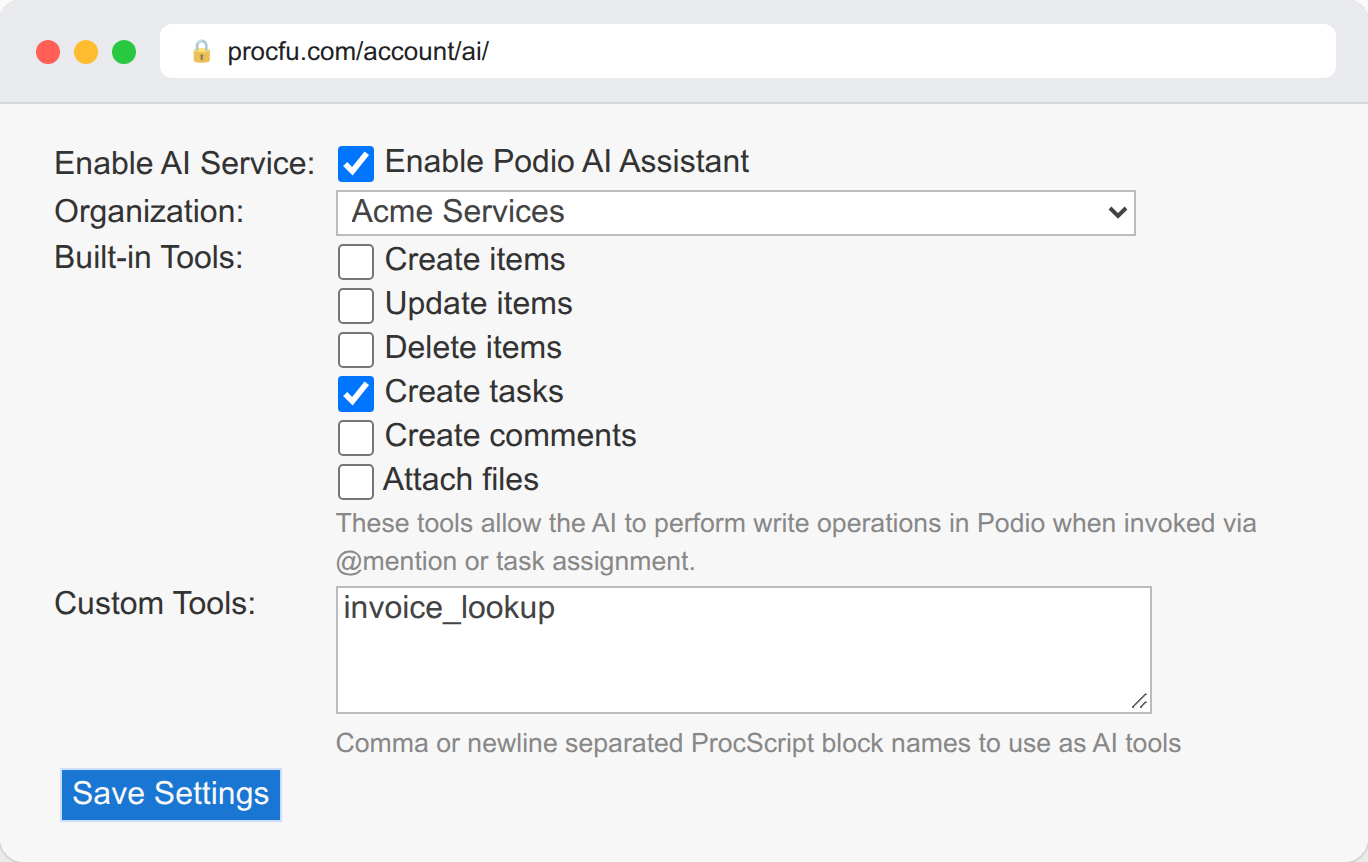
The same tool can be used by the AI assistant in Podio. Go to Account > AI Assistant, tick Create tasks under Built-in Tools and enter invoice_lookup under Custom Tools. ProcFu checks on save that the block exists.
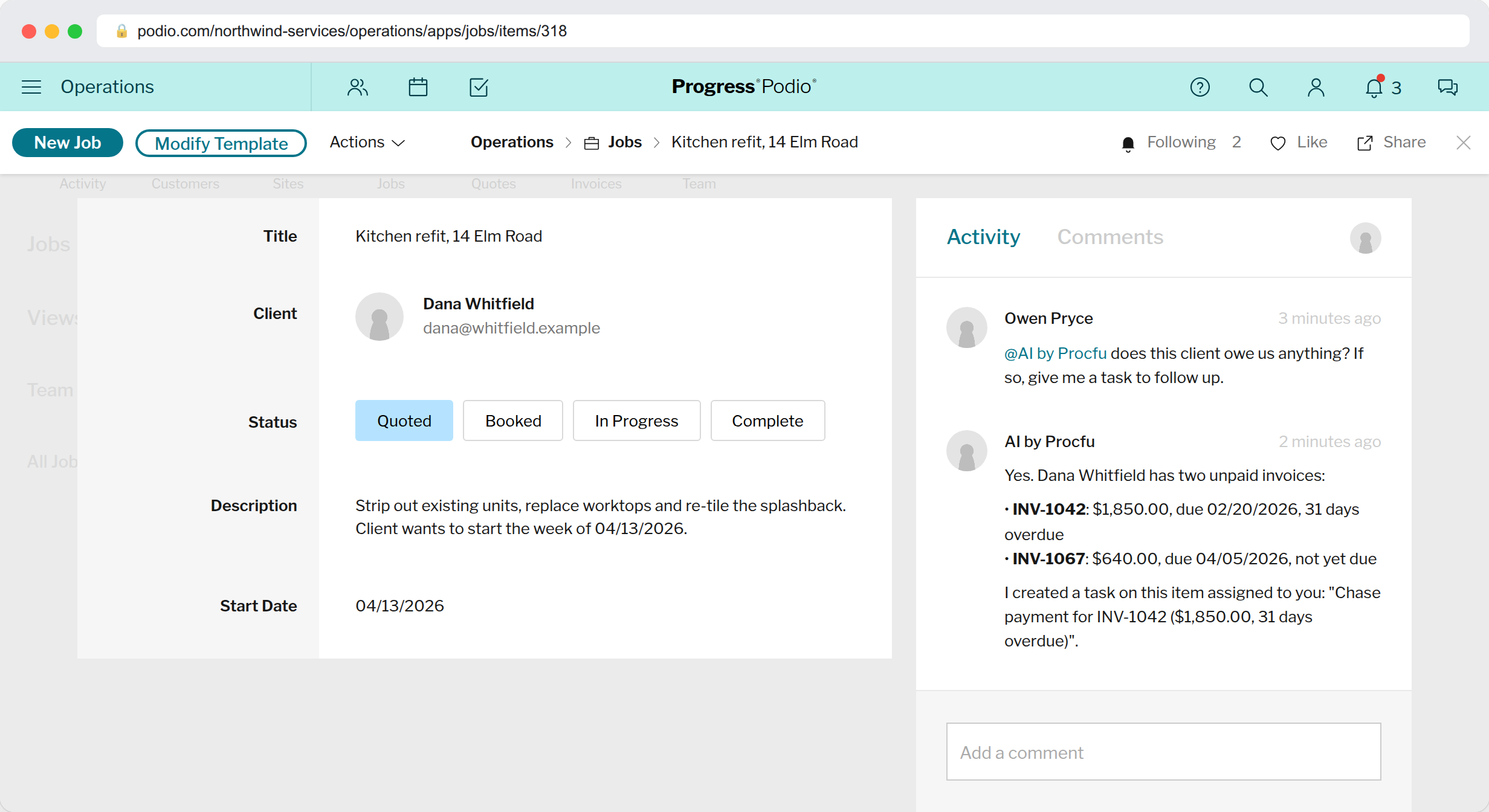
A salesperson can then write a comment on any job:
@AI by Procfu does this client owe us anything? If so, give me a task to follow up.
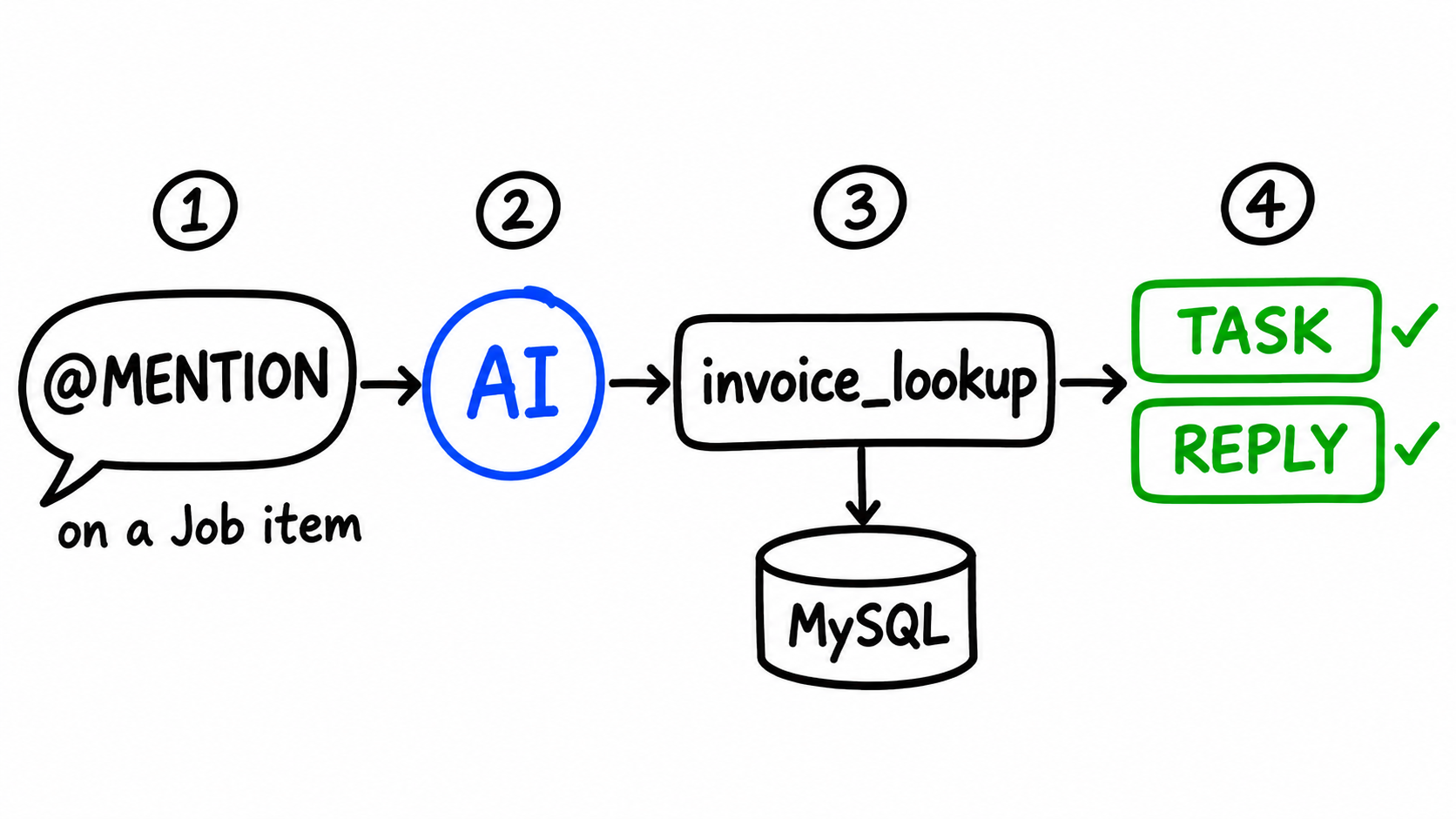
The assistant knows who sent the request (name and Podio user ID), so "give me a task" assigns the task to that person. It replies with a comment that says what it found and what it did.
How tools work with the in-Podio assistant
The in-Podio assistant responds to three things: an @mention of "AI by Procfu" in an item comment, a task assigned to "AI by Procfu", and a comment on a task that is assigned to it. On a task, earlier comments count as conversation history, so you can continue in later comments.
Even with no tools configured, the assistant has read-only tools. It can fetch items and their tasks, look up app structures, and read the text of attached PDFs, Word documents, presentations, spreadsheets, CSVs and text files. If the item's app has a ProcFu Data Sync, it also gets a tool for querying the synced data.
The write tools and custom tools you set on the Account > AI Assistant page are added to those. Two differences from script calls:
- Write actions still run as the ProcFu account owner, even though the reply comment is posted by the AI user.
- A custom tool name that no longer matches a block is skipped silently. In a script call, the same mistake throws an error.
If the assistant does something you didn't want, @AI by Procfu undo deletes its last comment and the comment that triggered it. It does not reverse items, tasks or field changes the assistant made, so be careful about enabling update and delete.
Setup and cost
- AI functions and the AI assistant require a premium plan.
- Set the Podio organization in Account > AI Assistant. The script functions use this setting too, and fail without it.
- For the in-Podio assistant, add
ai@procfu.comto each workspace as an external Client member. This is free. - Usage is charged in ProcFu actions, at 1 action per 250 AI tokens (this varies by plan tier). Tool calls add tokens, because tool definitions and results become part of the conversation. A small number of tools that return compact results costs less than enabling everything.
Custom tools are where most of the value is. Built-in tools handle Podio edits, but your business data often lives somewhere else, such as an accounting database, a supplier API or a spreadsheet. If a ProcScript function can reach it, a short block with name(), usage() and run() lets the AI use it, and it can only do what that block allows.