
ProcFu provides AI functions for working with natural language, including generating content, interpreting information, and producing written responses.
But not every automation needs AI to generate text.
Sometimes, all we need is a decision: Is this email spam? Which department should handle this enquiry? How promising is this sales opportunity?
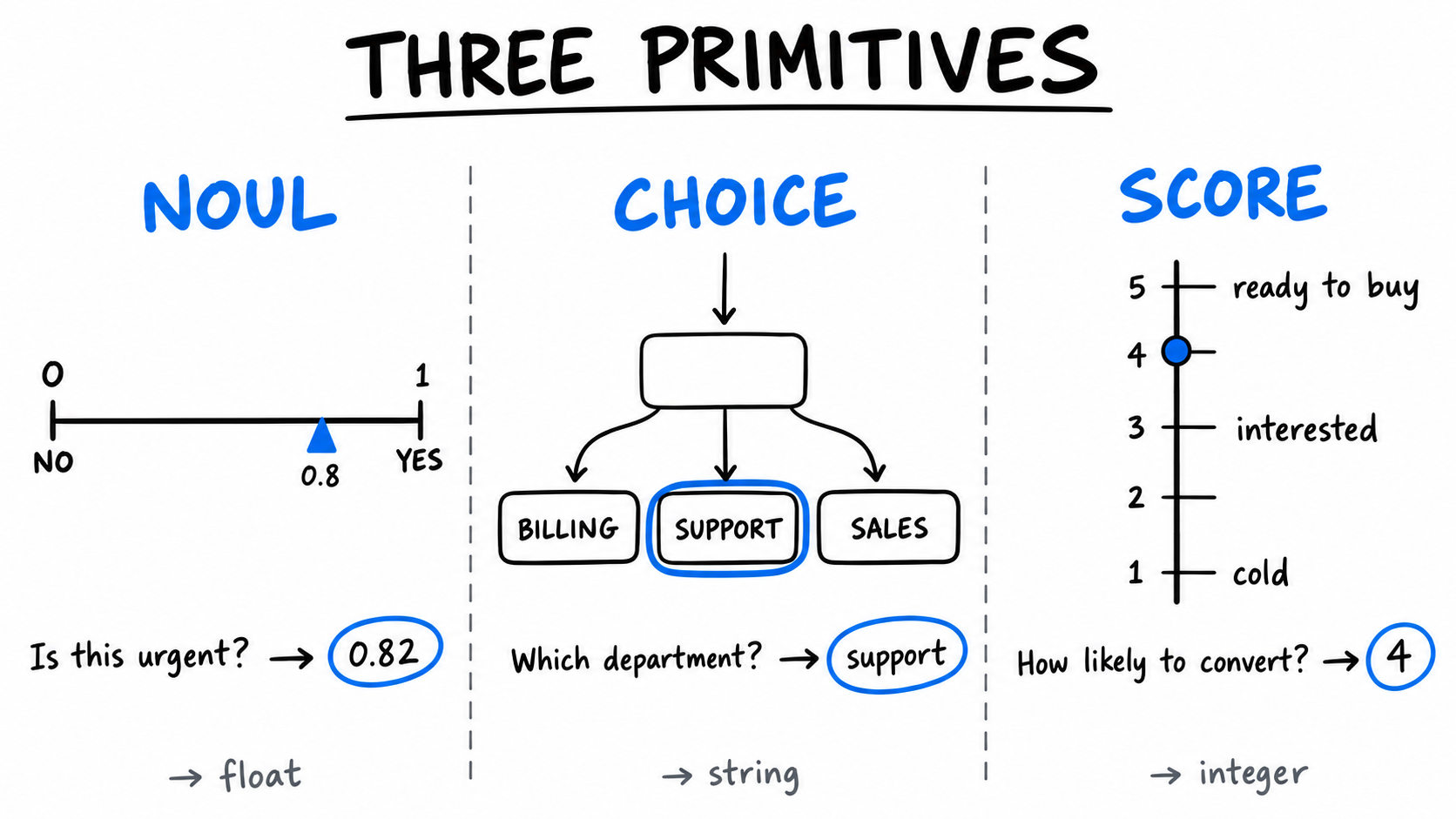
For these tasks, ProcFu offers three functions powered by Jev, a decision-making model developed by TypeSafe AI.
Unlike traditional large language models (LLMs), Jev is designed to evaluate information and return structured decisions rather than generate natural language.
The three functions are:
jev_noul.pf— Evaluates a yes-or-no question and returns a probability between 0 and 1.jev_choice.pf— Selects an answer from a predefined set of options.jev_score.pf— Evaluates information against an ordered set of criteria and returns a numeric score.
Jev is designed to deliver faster, lower-cost decisions than conventional generative AI for these types of tasks.
That doesn't mean Jev replaces ProcFu's existing AI functions. Generative AI remains useful when we need to draft emails, summarize documents, or produce written explanations.
The distinction is between generating content and making structured decisions.
In this guide, we'll explore Jev's three functions through practical automations built with ProcFu and Podio.
Our example CRM contains three apps:
- Clients — Customer and company information.
- Deals — Sales opportunities.
- Activities — Emails, calls, meetings, and other interactions.
We'll start by building a complete automation step by step, then explore additional use cases to demonstrate how Jev can support everyday business workflows.
Example 1: Detecting Spam Emails with Jev Noul
Imagine your sales team uses Podio to track customer communications.
Every time an email is received, a new record is created in the Activities app. The record contains the email content, the activity type, and any related customer information.
Some emails are legitimate business enquiries. Others are unsolicited promotions or spam.
Rather than asking someone to review every message, we can use Jev to evaluate whether an incoming email is likely to be spam.
Step 1: Create a flow in Podio Workflow Automation (PWA)
We created a flow called Check if spam in the Activities app.
The flow runs whenever a new activity is created. Since the Activities app also contains calls, meetings, and demonstrations, we added a filter to process only records where the activity type is Email.
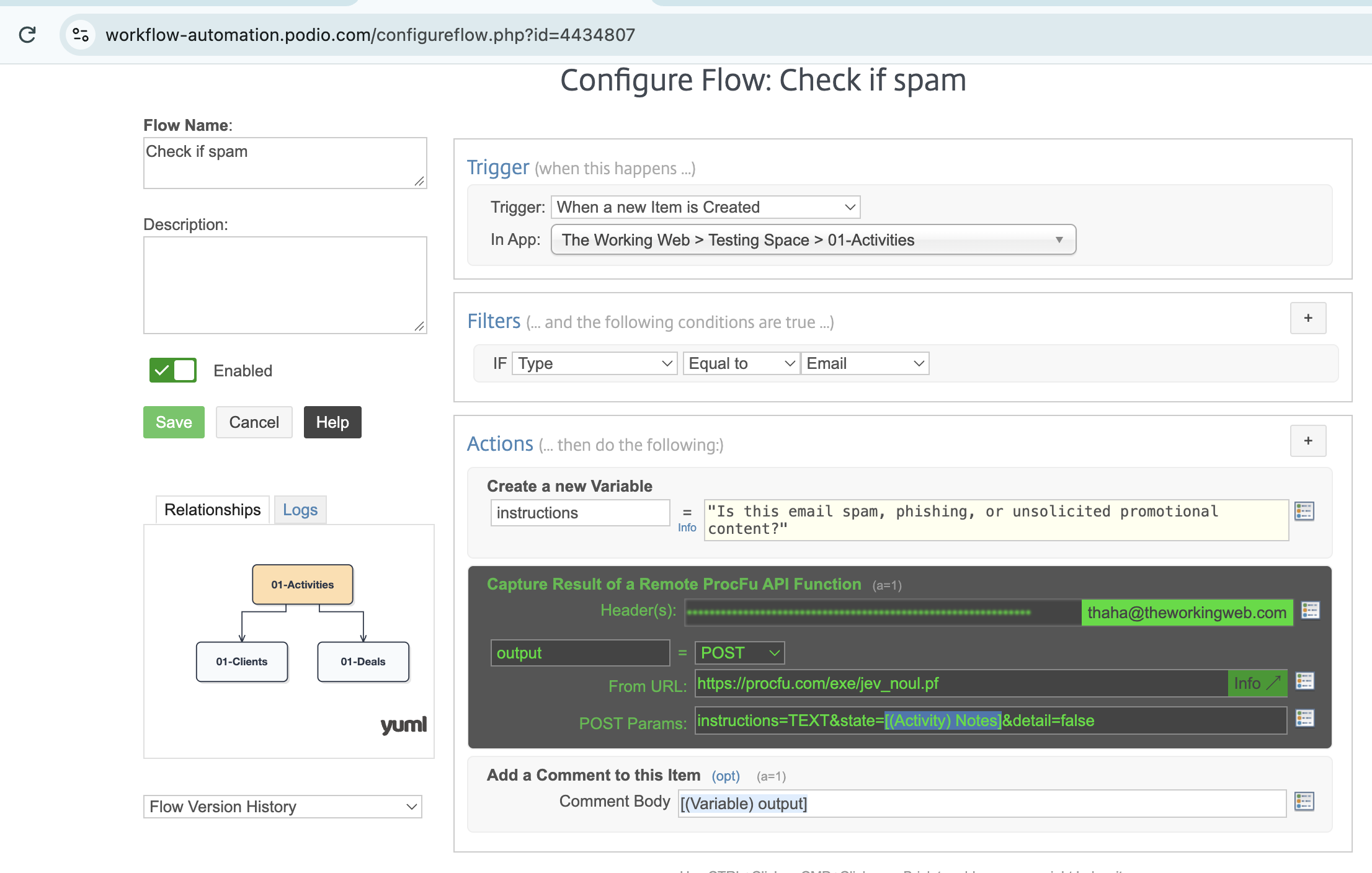
Next, we added three actions:
- Create a new Variable — Stores the question we want Jev to evaluate.
- Capture Result of a Remote ProcFu API Function — Sends the email content to Jev and captures the result.
- Add a Comment to this Item — Records the returned result on the Podio activity.
Step 2: Evaluate the email using Jev Noul
The jev_noul.pf function accepts three parameters:
instructions— The yes-or-no question Jev should evaluate.state— The information being evaluated.detail— Whether to return the detailed response. Defaults tofalse.
We use the ProcFu API Function action in PWA to call jev_noul.pf.
The function is configured with:
Instructions:
Is this email spam, phishing, or unsolicited promotional content?
State: The Notes field of the newly created Activity, containing the email message.
Detail: false
The function evaluates the email and returns a numeric result, which we capture in the output variable.
Finally, we add a comment to the Podio activity containing that result.
Because detail is set to false, we receive a single numeric result rather than a detailed JSON response.
A result closer to 1 indicates a higher probability that the email is spam, while a result closer to 0 indicates a lower probability.
Step 3: Test with an unsolicited promotional email
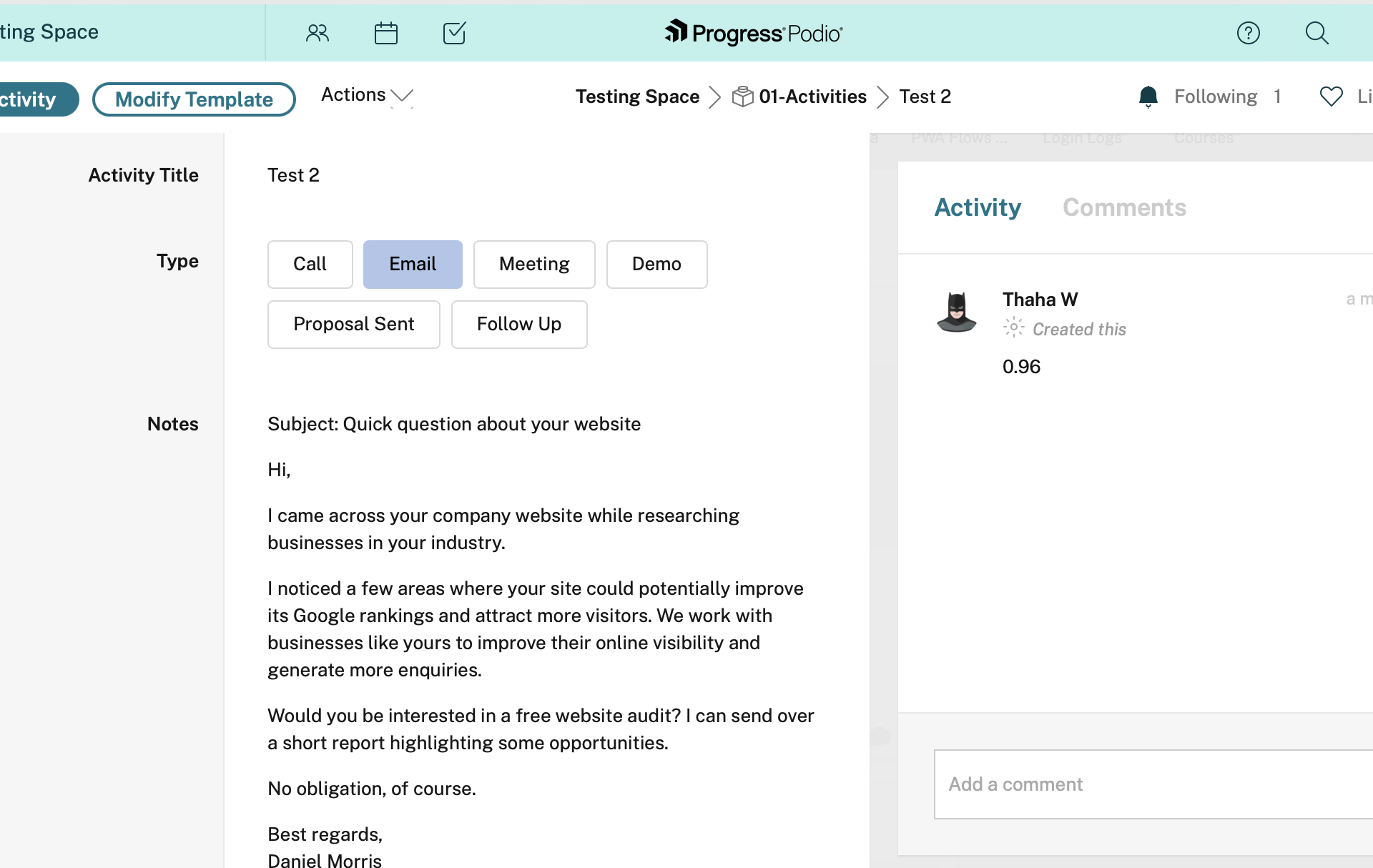
For our first test, we created an Activity containing an unsolicited email offering a free website audit.
The message began:
Subject: Quick question about your website
Hi,
I came across your company website while researching businesses in your industry.
I noticed a few areas where your site could potentially improve its Google rankings and attract more visitors.
The email continued by offering a free website audit and asking whether the recipient was interested.
When the record was created, ProcFu automatically triggered our flow and passed the message to Jev.
Jev returned: 0.96
This represents a 96% estimated probability that the email matches our spam criteria.
The result was automatically added as a comment on the Podio activity.
Step 4: Test with a legitimate business email
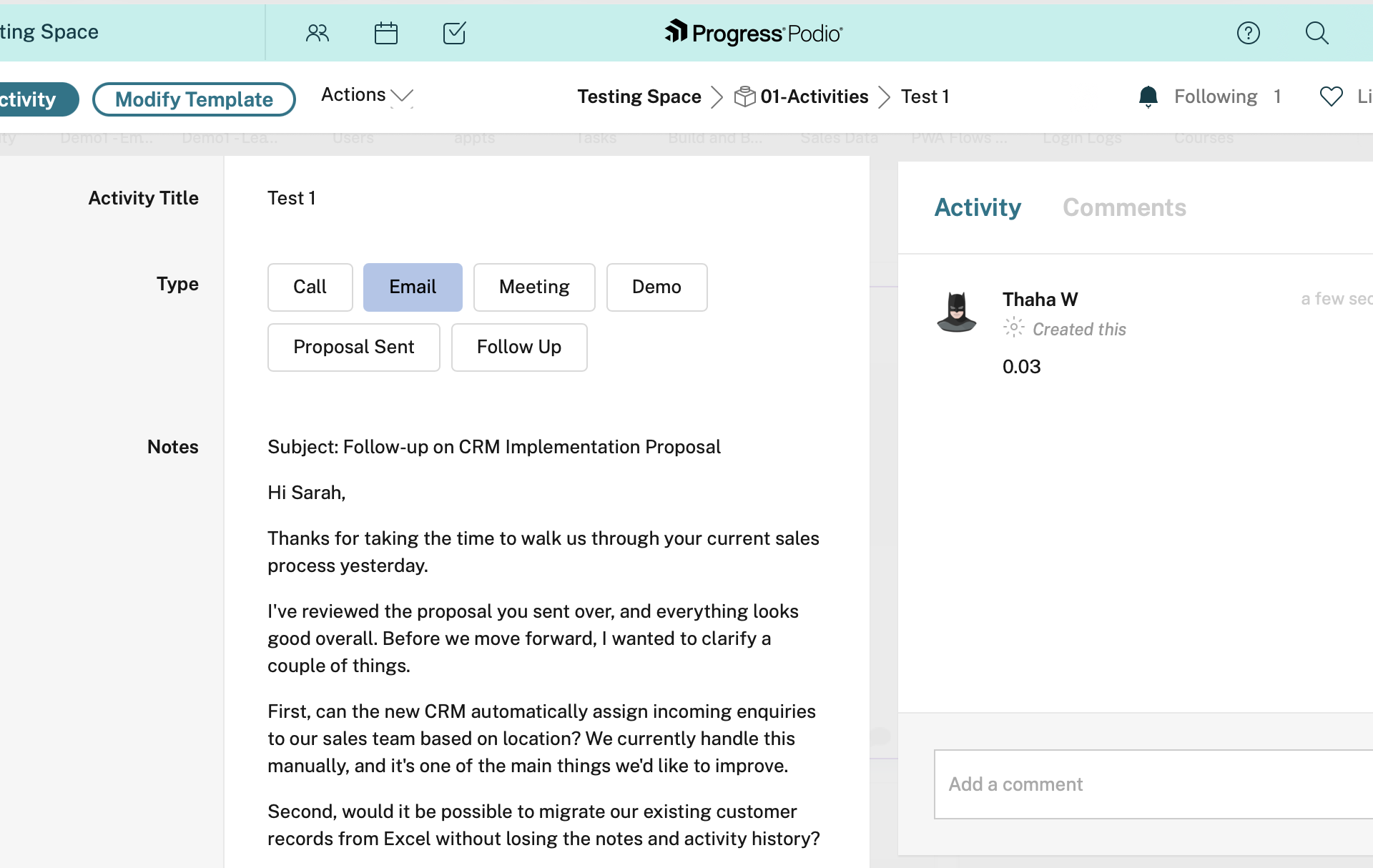
Next, we tested the same function with a legitimate customer enquiry.
This email was a follow-up to a CRM implementation proposal. The customer wanted to know whether the proposed system could automatically assign enquiries to salespeople based on location and migrate existing customer records from Excel.
The email also expressed interest in scheduling another call to discuss timelines and pricing.
This is exactly the kind of message a sales team would want to receive.
We created another Activity with this email content.
Jev returned: 0.03
That's a 3% estimated probability of spam, indicating that the message is unlikely to match our spam criteria.
Again, ProcFu automatically recorded the result as a comment.
Comparing the results
| Jev result | Interpretation | |
|---|---|---|
| Unsolicited website audit promotion | 0.96 | High spam probability |
| Legitimate CRM implementation follow-up | 0.03 | Low spam probability |
Both emails were processed using the same function and instructions. We didn't need to create separate rules for different senders, keywords, or message formats.
Jev evaluated the content of each message and returned a probability that ProcFu could use in subsequent automation steps.
Example 2: Classifying Incoming Emails with Jev Choice
Once an email passes our spam check, the next question is: What is the email about?
Using jev_choice.pf, we can automatically classify incoming emails into predefined categories such as Sales, Support, Billing, Partnership, or Other.
Unlike Jev Noul, which returns a probability for a yes/no question, Jev Choice selects one option from a list we provide.
Here's our function:
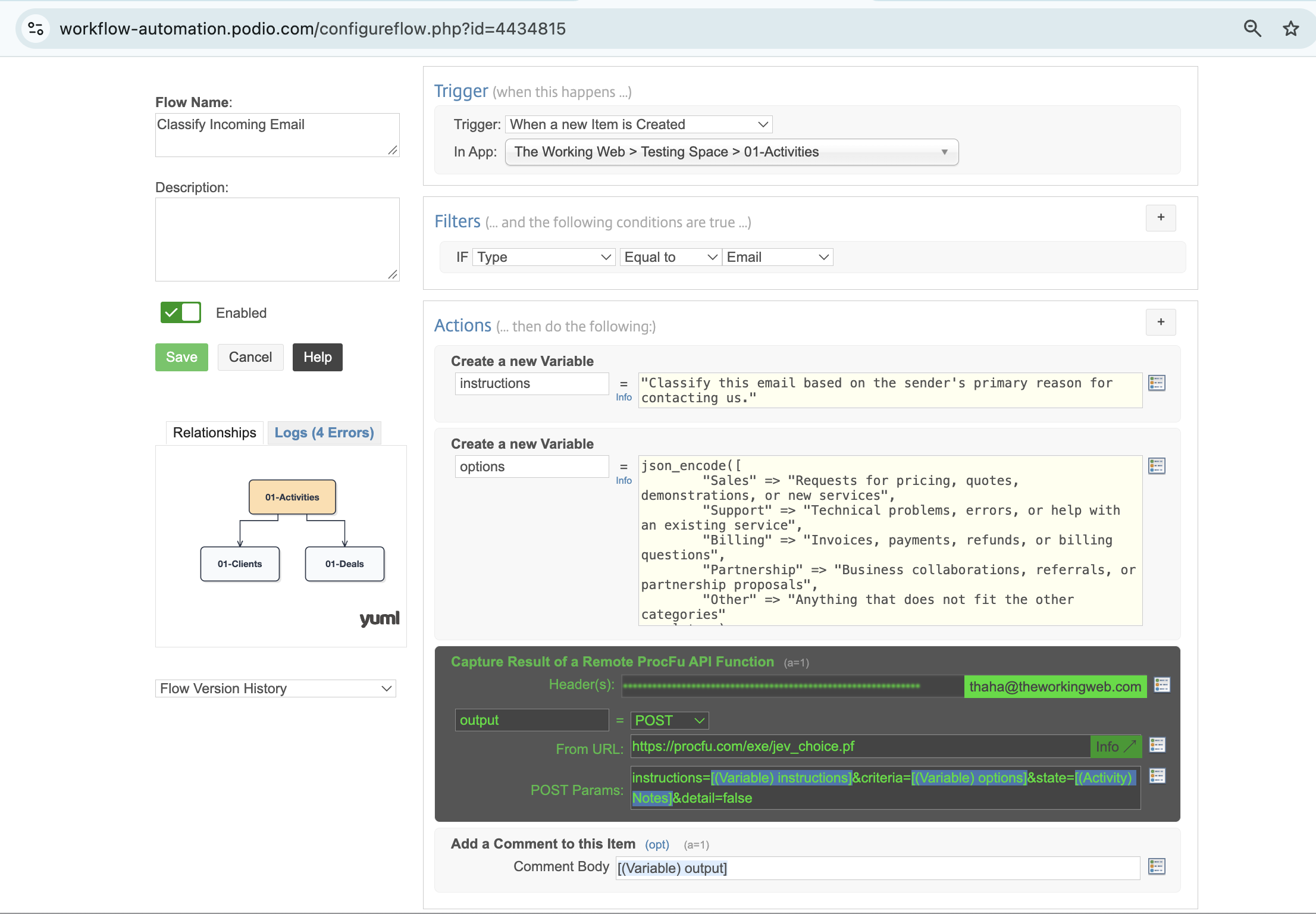
We tested this with an email from a customer questioning an unexpected £350 implementation charge on their invoice.
Jev returned: Billing
ProcFu automatically recorded the result as a comment on the Podio activity.
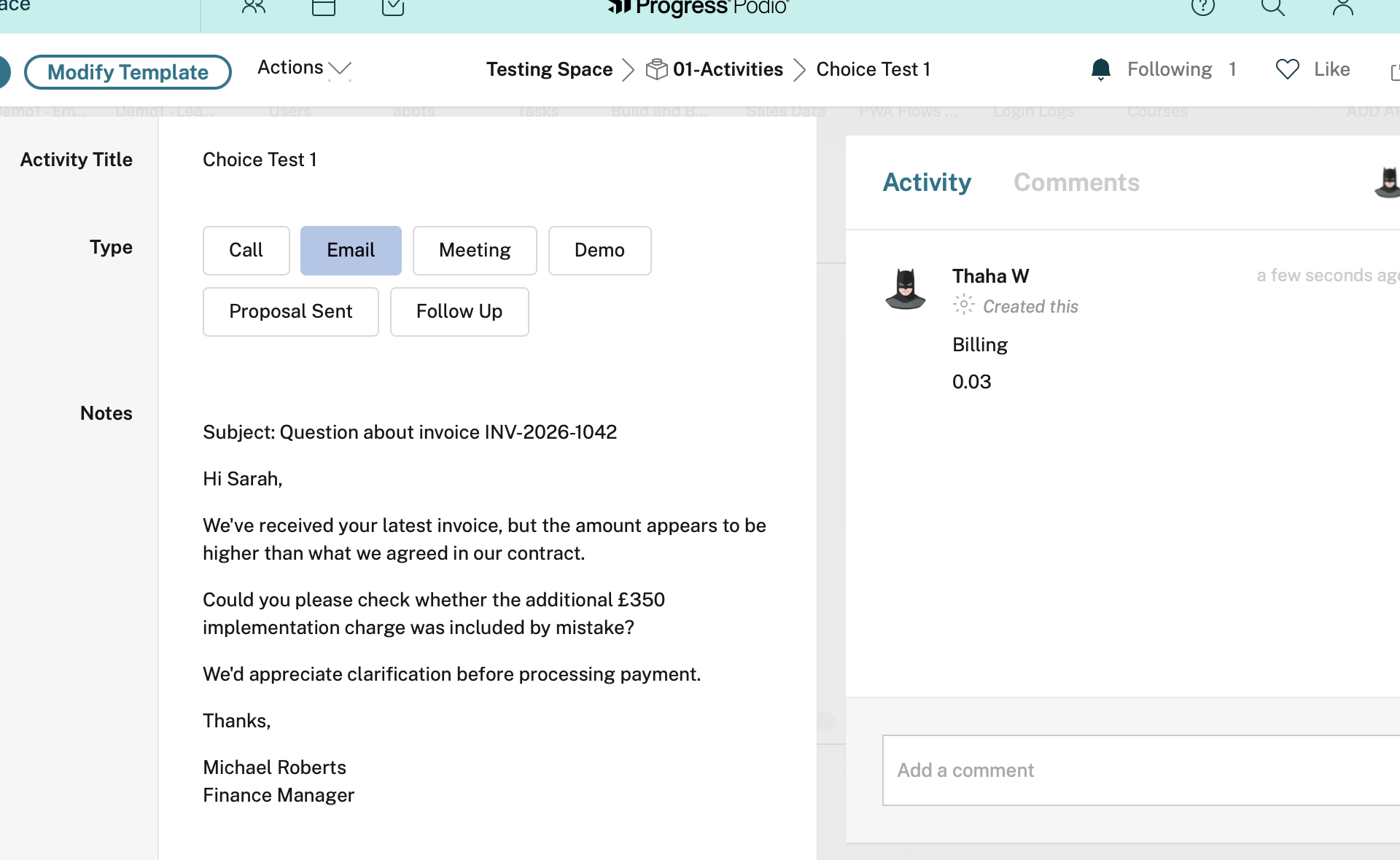
In a real workflow, this classification could automatically route the enquiry to the finance team.
When to use Jev Choice: Whenever an automation needs to select from a defined set of options, such as enquiry categories, departments, document types, or workflow actions.
Example 3: Scoring Sales Opportunities with Jev Score
Not every sales opportunity deserves the same attention. Some prospects are ready to buy, while others are still exploring their options.
Using jev_score.pf, we can evaluate opportunities against predefined criteria and assign a numeric score. In our example, five ordered criteria produce a score on a scale from 0 to 4, where higher scores indicate stronger sales opportunities.
For this example, we're using our Podio Deals app.
Setting up lead scoring
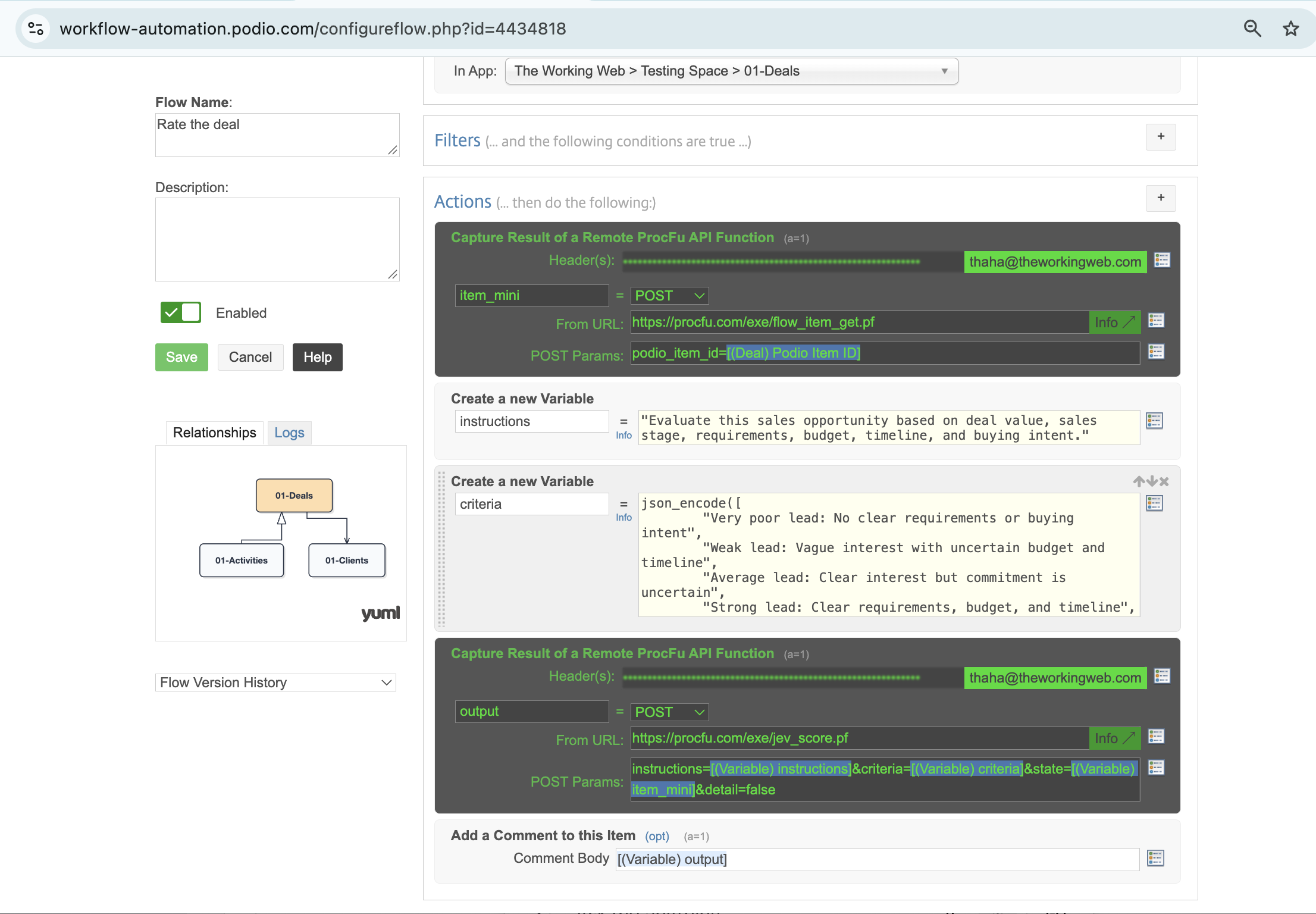
Here, flow_item_get() provides a simplified way to retrieve the Podio item's information. Instead of manually assembling individual fields, we pass the deal's information directly to our AI function.
Testing the same deal with different information
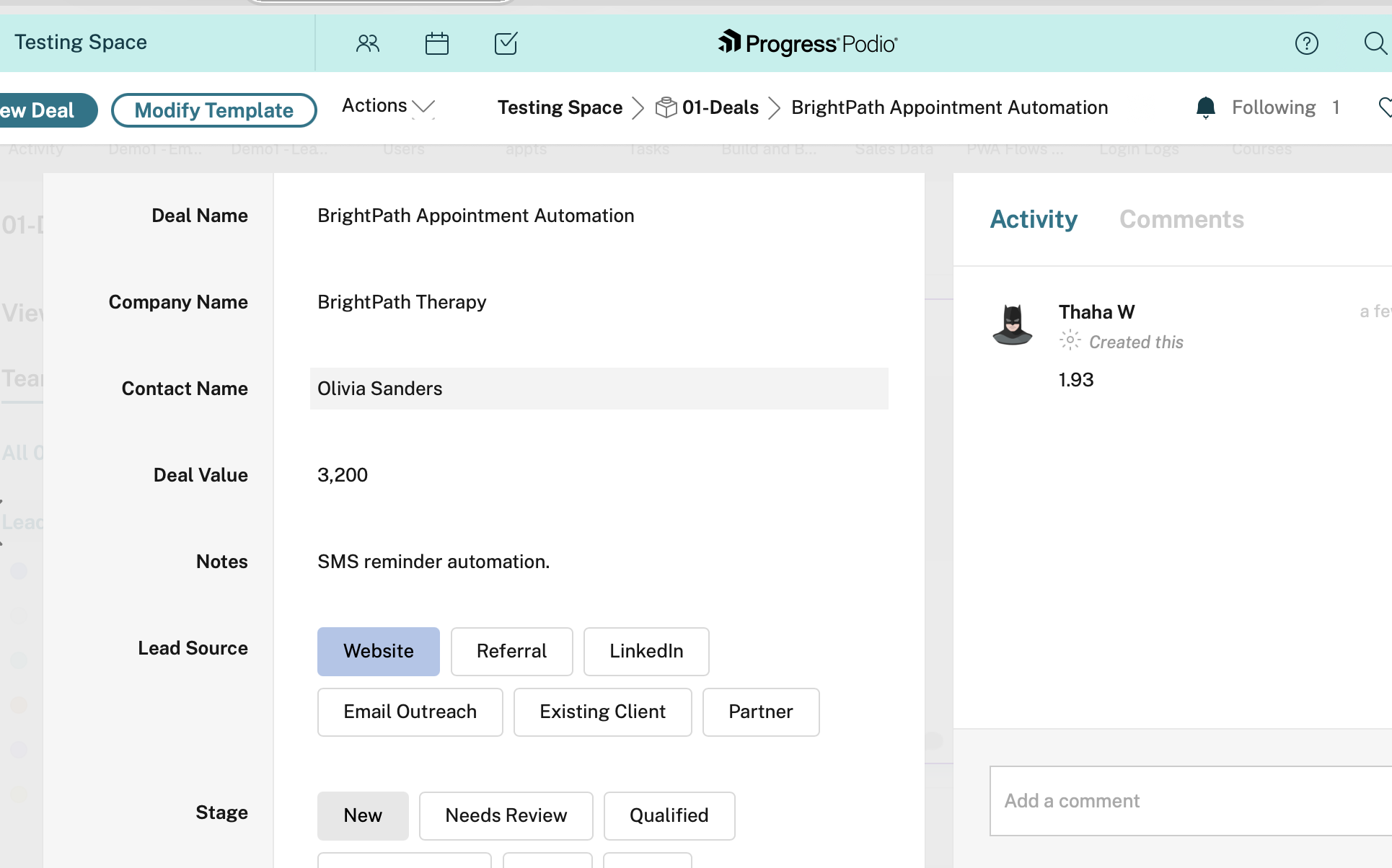
We tested a deal called BrightPath Appointment Automation, valued at £3,200.
Initially, the Notes field contained only:
SMS reminder automation.
Jev returned: 1.93
We then expanded the Notes to explain that the prospect operates three clinics, spends approximately 10 hours per week manually contacting patients, has an approved £3,500 budget, and wants implementation within six weeks. The operations manager had also requested a demonstration.
Jev returned: 3.39
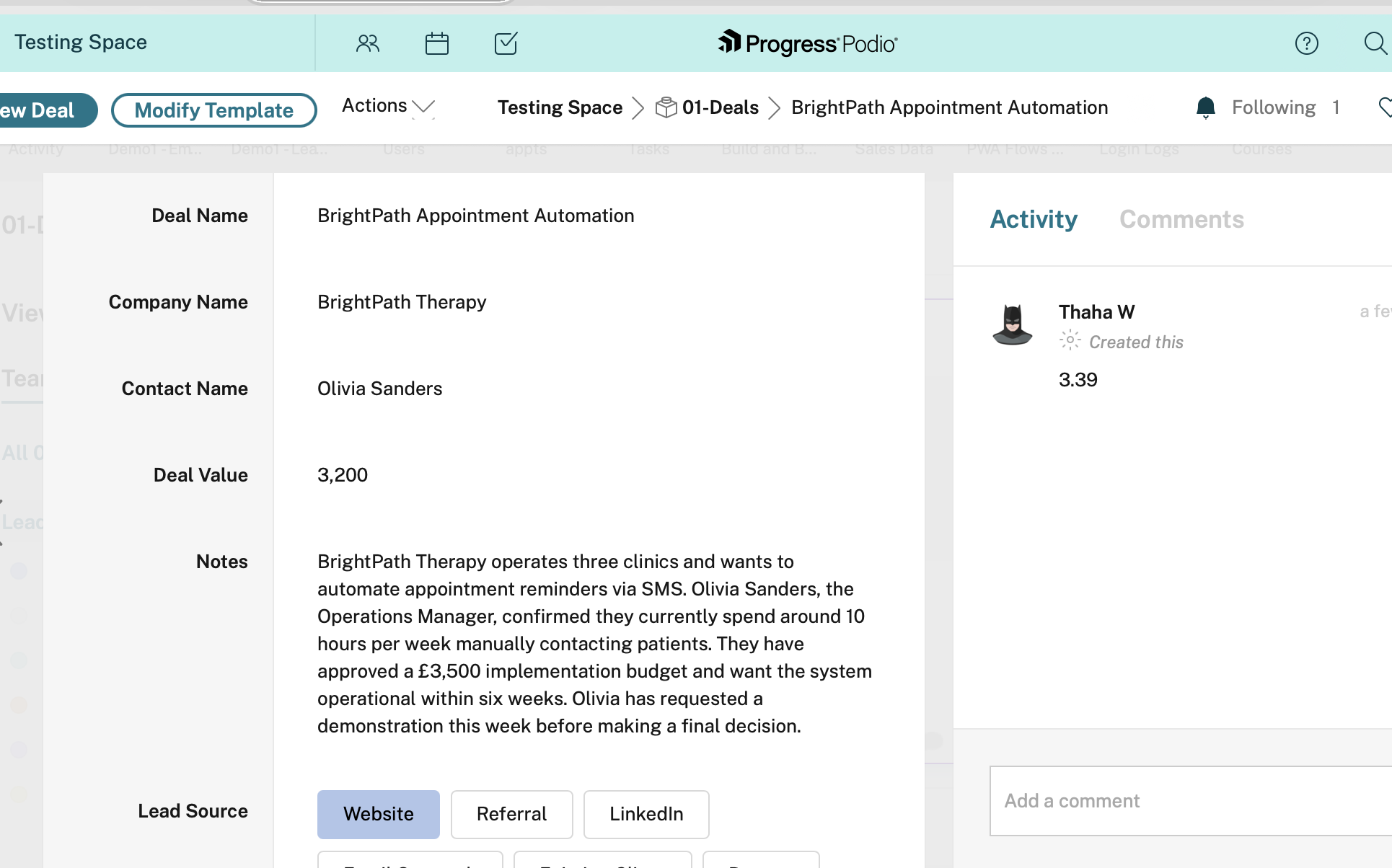
The deal value and other fields remained unchanged. Only the Notes were expanded.
With limited information, Jev rated the opportunity close to Average. With clearer requirements, confirmed budget, and stronger buying signals, the score increased substantially.
When to use Jev Score: When you need to evaluate information against an ordered scale, such as sales lead quality, support urgency, or customer satisfaction.
These scores are model assessments based on the supplied information, not statistically validated probabilities of winning a deal.
When to Use Jev vs Generative AI in ProcFu
Jev and ProcFu's generative AI functions serve different purposes.
| Requirement | Recommended approach |
|---|---|
| Determine whether an email is spam | Jev Noul |
| Classify an enquiry into predefined categories | Jev Choice |
| Score a sales opportunity against defined criteria | Jev Score |
| Summarize meeting notes | Generative AI |
| Draft a customer email | Generative AI |
| Generate a written report | Generative AI |
Jev is designed for structured decisions where the expected output is a probability, a category, or a score. Generative AI is better suited to tasks requiring written content, explanations, or summaries.
The two approaches can also work together. For example, Jev could classify an incoming customer enquiry, while a generative AI function drafts an appropriate response based on that classification.
Conclusion
With just three functions, Jev introduces a useful way to automate decisions in ProcFu.
As we've demonstrated, we can evaluate incoming emails for spam, classify enquiries, and score sales opportunities using relatively simple functions integrated into existing Podio workflows.
These are small decisions individually, but they can become repetitive when teams handle large volumes of records.
By combining Jev's structured outputs with ProcFu's workflow automation capabilities, we can turn those decisions into automated actions without relying on complex keyword rules or parsing AI-generated text.