
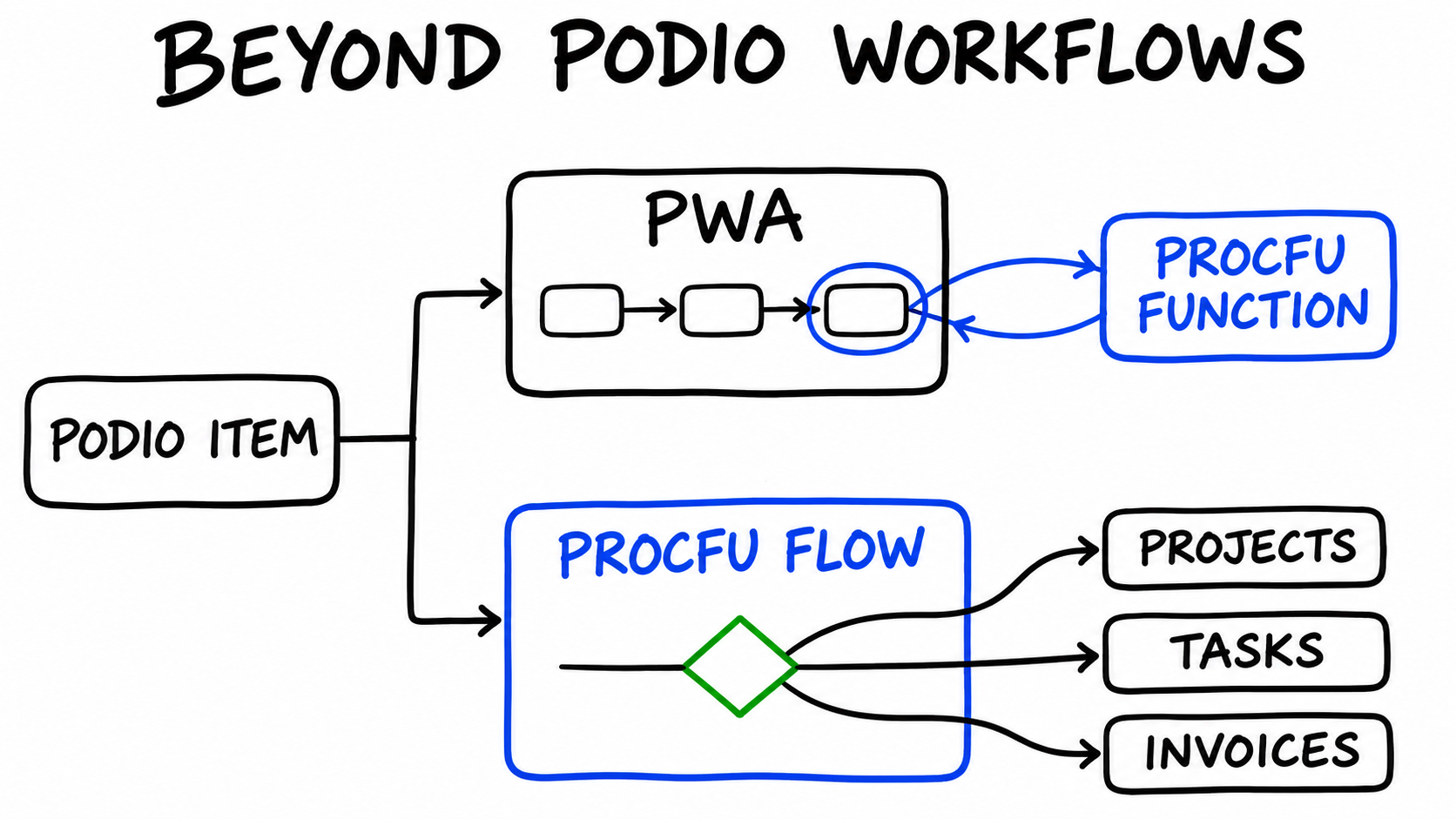
Podio Workflow Automation (PWA, formerly GlobiFlow) handles most everyday automation well: a trigger fires, filters check a few fields, and a list of actions runs. Problems start when a rule needs data from another app, when one event should produce several items in different apps, or when the next step depends on a combination of conditions.
ProcFu gives you two ways past that point:
- Keep the PWA flow and call a ProcFu function for the step PWA can't do.
- Move the logic into a ProcFu Automation Flow that runs directly on Podio item events.
This post shows both with worked examples and explains how to choose.
Option 1: Call a ProcFu function from PWA
Every ProcFu function is available over HTTPS at https://procfu.com/exe/<function>.pf. In PWA you call it with a remote POST action. If you have the ProcFu Chrome extension installed, the action appears as Capture Result of a Remote ProcFu API Function. Without the extension, use Capture Result of a Remote POST or GET and add the Authorization: Basic ... header shown on the function's page under API Functions in your ProcFu account.
The action has four parts:
- Header(s): your ProcFu authorization header.
- Variable name: where PWA stores the response, for example
output. - From URL: the function, for example
https://procfu.com/exe/podio_comment_create.pf. - POST Params: the function's arguments as
name=valuepairs joined with&, using PWA tokens for item values.
Later actions in the same flow can use the captured result as a token, such as [(Variable) output] in a comment. The Jev post shows this pattern step by step with screenshots.
Many gaps can be filled with a single built-in function. For example, flow_app_search.pf searches another app by field value, and podio_item_task_create.pf creates a task assigned by email address. When the step needs more than one call, write the logic yourself in ProcScript and call it with call_procscript.pf.
Worked example: validating an order before it moves on
Suppose an Orders app has a Client relationship field, a State field, a Resale Certificate text field for the certificate number, a Payment Terms category, an Order Total money field and a Validation category (Pending, Passed, Failed). The Clients app has a Credit Limit number field.
The rules are:
- Orders shipping to California need a resale certificate.
- Net 30 orders must not exceed the client's credit limit.
- The PO number must not already exist on another order.
PWA filters can only check fields on the item that triggered the flow. The second and third rules need data from other items, so they go into a ProcScript saved in the ProcFu Code Editor as validate_order:
// validate_order: check an Order and write the result back to Podio
$order = flow_item_get($payload["item_id"]);
$problems = [];

IF ($order["state"] == "CA" && empty($order["resale-certificate"])) {
    array_push($problems, "CA orders need a resale certificate");
}

IF ($order["payment-terms"] == "Net 30") {
    $client = flow_item_get($order["client"][0]["item_id"]);
    IF ($order["order-total"]["amount"] > $client["credit-limit"]) {
        array_push($problems, "Order total exceeds the client's credit limit");
    }
}

$same_po = flow_app_search($order["app_id"], "po-number", $order["po-number"], "E", 10);
IF (count($same_po) > 1) {
    array_push($problems, "PO number is already used on another order");
}

IF (count($problems) > 0) {
    podio_item_fields_update($payload["item_id"], json_encode(["validation" => "Failed"]), false, false);
    podio_comment_create($payload["item_id"], "Validation failed: " + implode("; ", $problems), false, false);
} ELSE {
    podio_item_fields_update($payload["item_id"], json_encode(["validation" => "Passed"]), true, false);
}

RETURN count($problems);
The field keys (state, payment-terms, credit-limit) are the external IDs of your Podio fields. flow_item_get returns every field in simplified form: category fields as option text, money fields as amount and currency, and relationship fields as a list of item_id, app_id and title.
In PWA, the Orders flow triggers when an item is created and runs one ProcFu action:
- From URL:
https://procfu.com/exe/call_procscript.pf - POST Params:
scriptname=validate_order&payload={"item_id":ITEM_ID}, whereITEM_IDis the item ID token from PWA's token picker
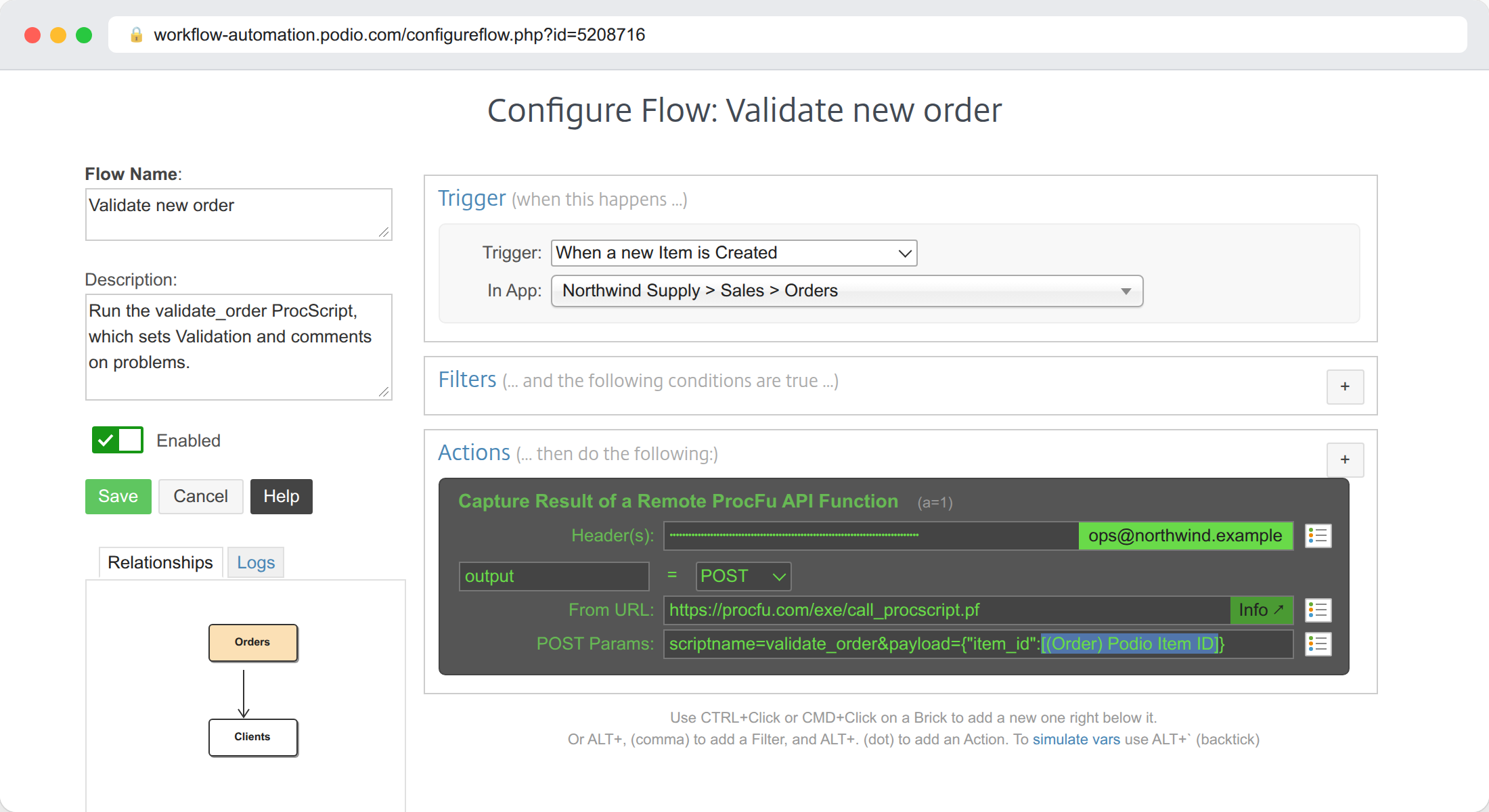
call_procscript decodes the JSON payload into the script's $payload variable. The script returns the number of problems, so the captured PWA variable holds 0 when the order is clean.
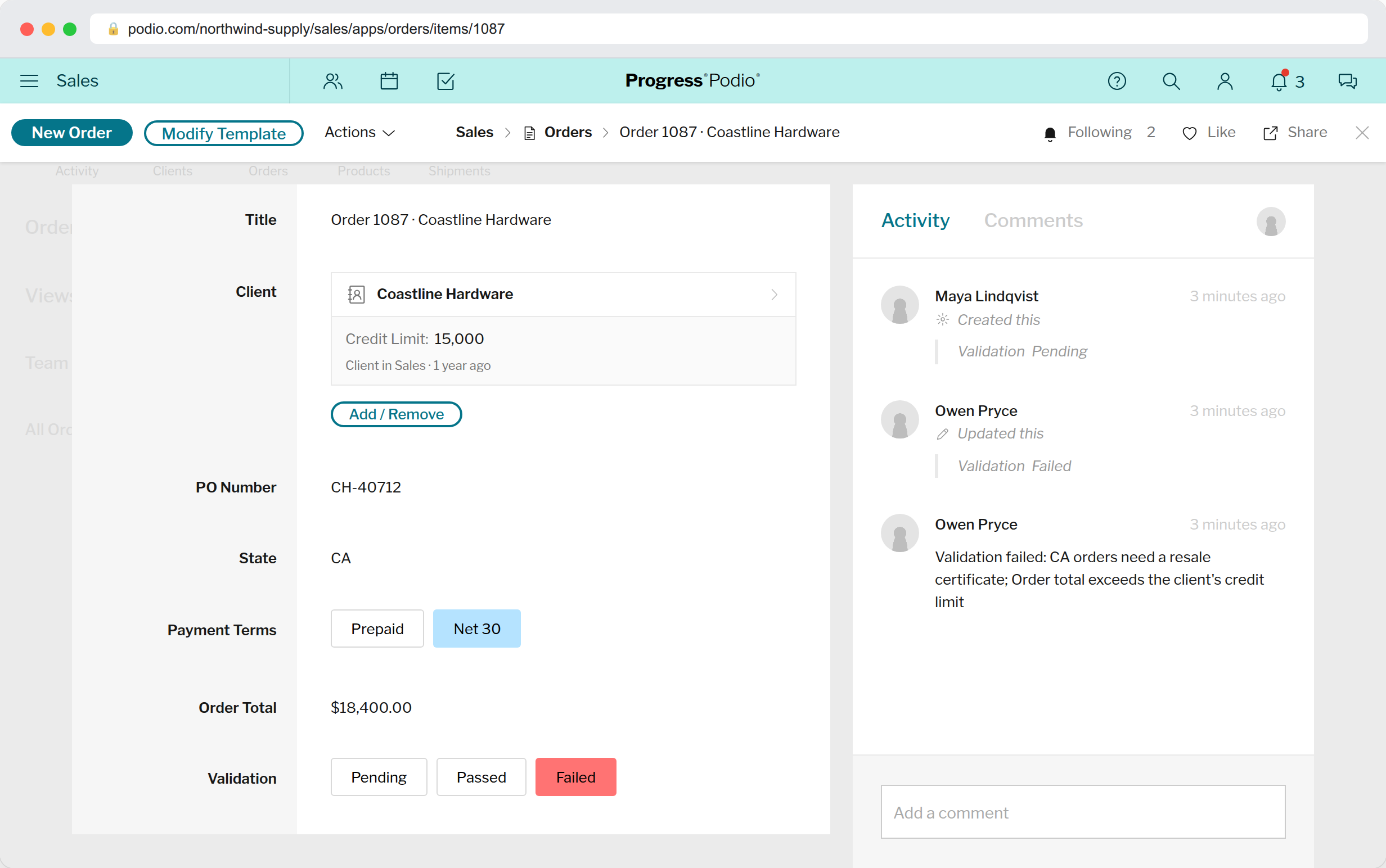
The script writes its result to Podio rather than leaving PWA to interpret it. The Validation field and the comment stay on the item, and any later automation can key off Validation = Passed instead of re-checking the rules.
An order to California with no resale certificate, on Net 30 terms above the client's credit limit, ends up like this:
Two details worth knowing:
- The last two arguments of
podio_item_fields_updateandpodio_comment_createarehookandsilent. Withhookset tofalse, the update doesn't fire Podio webhooks, so other automations ignore it. The example setshooktotrueonly on the Passed update, so downstream automations still trigger. - A function called from PWA has to finish while PWA waits for the response. For long jobs, use
call_procscript_bg.pf. It queues the script and returnsqueuedimmediately, and a background run can last up to two hours.
Option 2: Move the logic into a ProcFu Flow
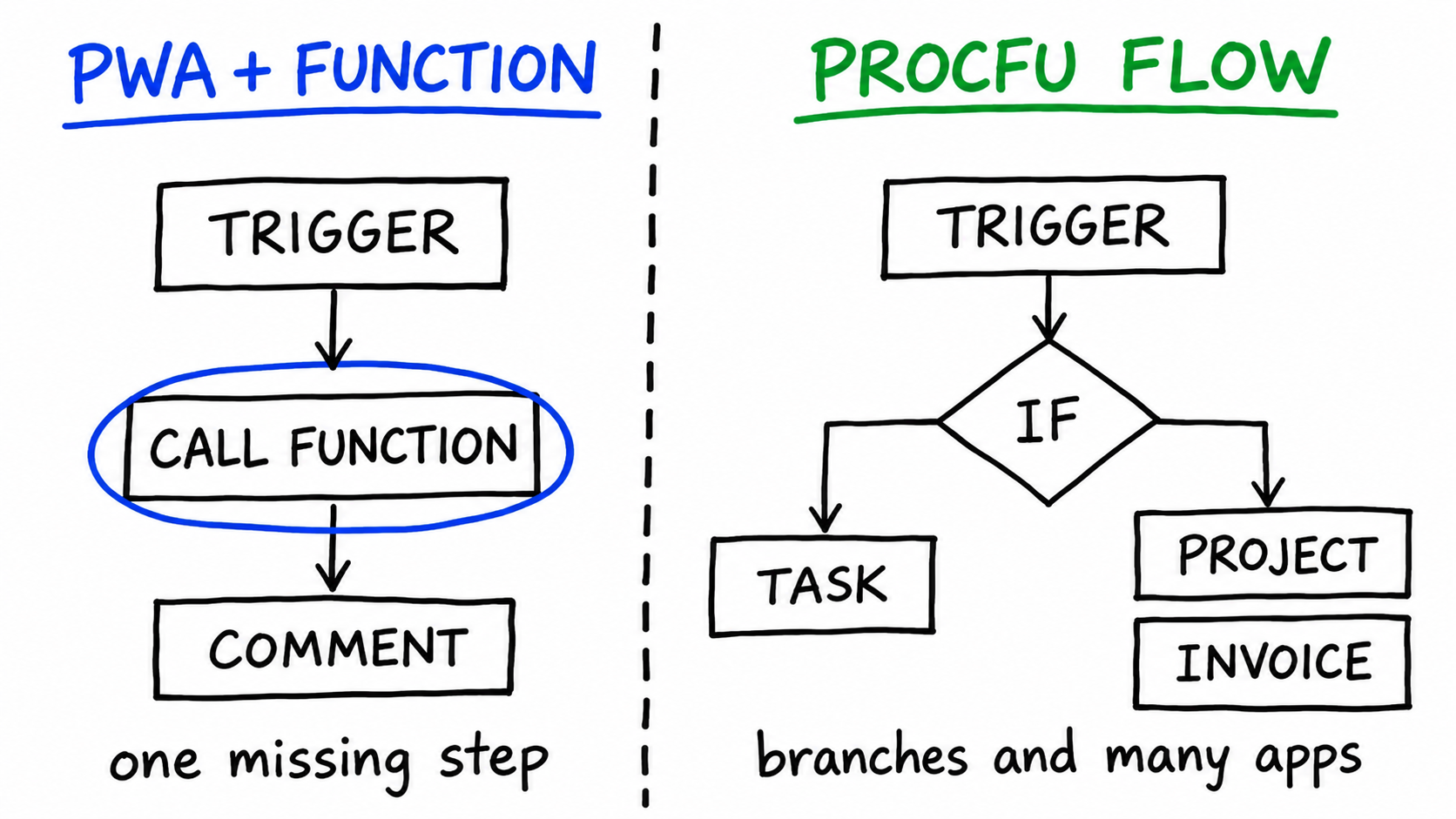
A PWA flow with one ProcFu call in the middle is fine. If most of its actions are ProcFu calls, the logic has already moved out of PWA and you are splitting it between two tools. That is the time to build it as a ProcFu Flow.
ProcFu Flows are set up under Flows in your account. You add a Podio app, and ProcFu registers create, update and delete webhooks on it. Then you add flows with one of four triggers: On Create, On Update, On Delete or On Schedule (hour of day and day of week, in your timezone). PWA is not involved, so this also works for teams on Podio Plus.
Each flow receives a $payload containing the item's simplified fields in item_fields. Update flows also get item_changes, which lists every changed field with its from and to value.
Worked example: a won deal creates work in three apps
When a deal in the Deals app changes to Won, the team wants:
- a Project item linked to the deal and client,
- an Invoice item for the deal value,
- a kickoff task on the project, assigned to a manager for large deals and to the account manager otherwise,
- a comment on the deal linking everything together.
As an On Update flow in the Deals app:
// Deal won: create project, invoice and kickoff task
$change = $payload["item_changes"]["status"];
IF (empty($change) || $change["to"] != "Won") {
    RETURN "not a win";
}

$deal = $payload["item_fields"];
$client_id = $deal["client"][0]["item_id"];

$project_id = podio_item_create(11111111, json_encode([
    "title" => $deal["title"],
    "deal" => $payload["item_id"],
    "client" => $client_id
]), true, false);

$invoice_id = podio_item_create(22222222, json_encode([
    "title" => "Invoice: " + $deal["title"],
    "project" => $project_id,
    "amount" => $deal["value"]["amount"]
]), true, false);

IF ($deal["value"]["amount"] > 10000) {
    $owner = "manager@example.com";
} ELSE {
    $owner = $deal["account-manager"][0]["email"];
}
podio_item_task_create($project_id, "Kickoff call", "Deal value: " + $deal["value"]["amount"],
    $owner, date("Y-m-d", strtotime("+2 days")), "", false, false);

podio_comment_create($payload["item_id"], "Project " + $project_id + " and invoice " + $invoice_id + " created.", false, false);
Replace 11111111 and 22222222 with the app IDs of your Projects and Invoices apps. Relationship fields take the related item's ID, and the invoice's Amount is a plain number field here. The checks at the top matter: an update flow runs on every edit to the deal, so it exits unless the Status field itself changed to Won.
The kickoff branch is the part that is awkward in PWA. There you would need two near-identical flows with opposite filters, and every rule change would have to be made in both.
Flow Builder, or code
New flows open in the visual Flow Builder, where you assemble steps called bricks. Search Items and Get Referenced fetch data. Set Variable, For Each and If / Condition handle logic, and the If brick has a has changed operator for update flows. Create Item, Update Item, Create Comment and Assign Task write back to Podio.
The deal example can be built almost entirely from bricks. The exception is the either/or task owner, because the If brick has no else. When you need that, click Switch to Code. ProcFu compiles the bricks into ProcScript so you can continue from there. The switch is one-way.
To test a flow, select a real Podio item in the editor and click Run Flow to execute the flow against it. Last Payload shows exactly what the flow received, and the logs record each run with its execution time and any errors.
Choosing between them
| Situation | Use |
|---|---|
| A working PWA flow needs one extra step (a lookup, an AI decision, a calculation) | PWA + one ProcFu function call |
| Rules depend on data in other apps, but the flow is otherwise simple | PWA + call_procscript |
| One event creates or updates items in several apps | ProcFu Flow |
| The next step depends on several conditions, with either/or outcomes | ProcFu Flow |
| You need to loop over related items or a view | ProcFu Flow (For Each, flow_view_fetch) |
| Recurring checks, such as reminders on overdue items every morning | ProcFu Flow, On Schedule |
| Your team is on Podio Plus without PWA | ProcFu Flow |
Whichever you choose, write the result back to Podio: set a status field, create the related items, add a comment saying what happened. The next person, or the next automation, can then see the outcome on the item itself.