 ProcFu:
Home
App-Builder
Apps
ProcScript-Code
Code
Automation-Flows
Flows
Functions-API
Functions
Plans
login
ProcFu:
Home
App-Builder
Apps
ProcScript-Code
Code
Automation-Flows
Flows
Functions-API
Functions
Plans
login
Podio Client Portal
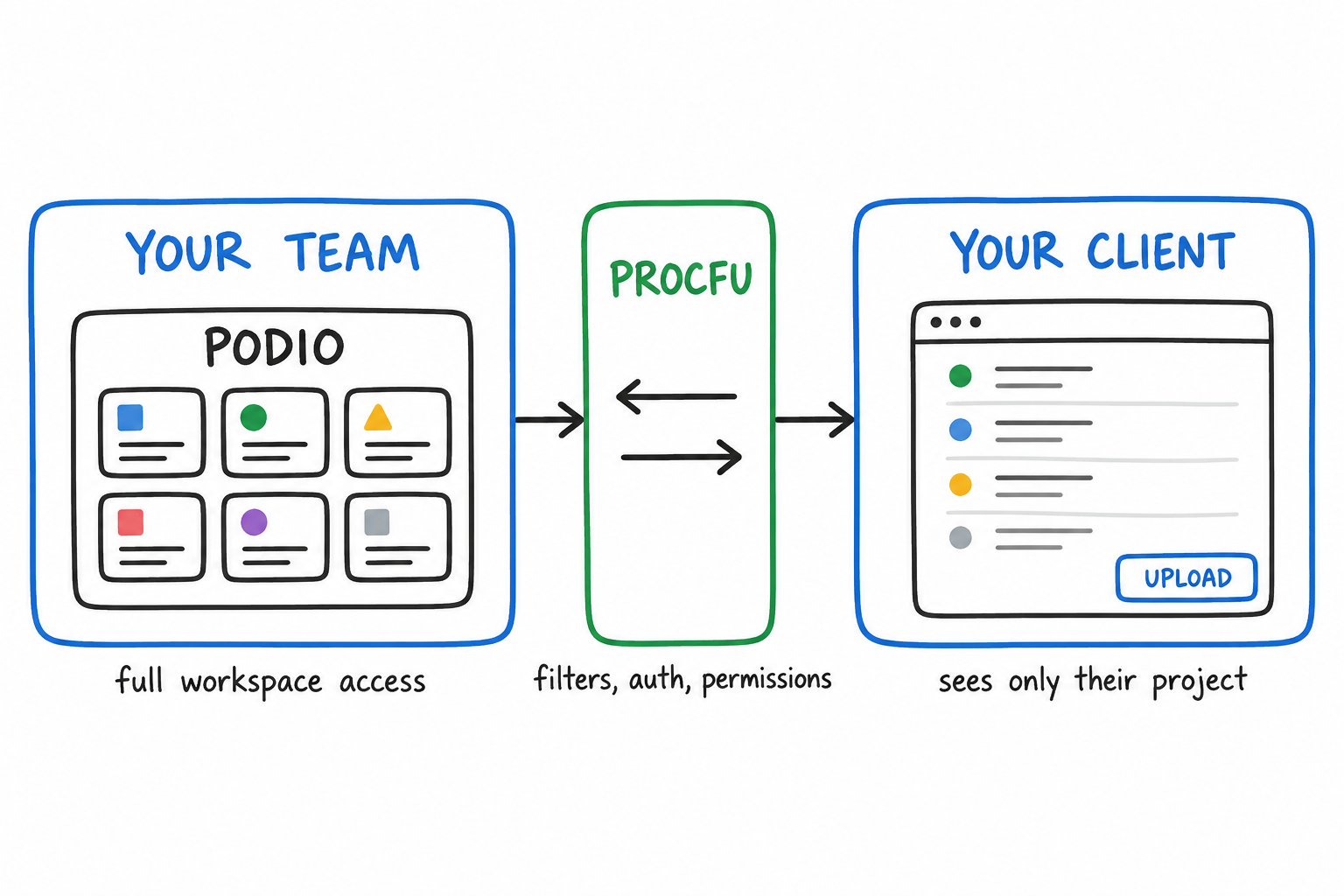
A Podio client portal gives your clients a dedicated place to check project status, submit information, upload files, and approve work — without ever logging into Podio. Your team keeps working in Podio. The client sees a focused interface built around their project, case, or account.
A Podio client portal gives your clients a dedicated place to check project status, submit information, upload files, and approve work — without ever logging into Podio. Your team keeps working in Podio. The client sees a focused interface built around their project, case, or account.
This is different from a customer portal, which tends to be broader self-service: tickets, orders, payments. A client portal is relationship-based. The client has an ongoing engagement with your team, and the portal is where that relationship lives outside of email.
The WAU Portal Gap
WAU Portal shut down in July 2022. It was the most common way to give Podio clients external access to their records. Teams that depended on WAU had to scramble — some moved to SharePoint, some built custom apps, some went back to email updates.
ProcFu's AppFrame app builder fills that gap. It connects directly to Podio (and other data sources) and gives you a visual builder for external-facing apps with real authentication, field-level permissions, and custom logic. It does more than WAU did: multiple auth methods, dashboard screens, code events for validation and workflows, and support for data sources beyond Podio.
What A Client Portal Needs
Most client portals need three things before anything else:
- Status view — the client can see where their project, case, or engagement stands without emailing to ask.
- Request or upload form — the client can submit information or files directly into Podio records.
- File collection — documents, photos, signed PDFs flow into the right Podio item instead of sitting in an inbox.
These three remove the most email back-and-forth. Don't build a full portal upfront. Ship the minimum, see what clients actually use, then expand.
How It Works With ProcFu AppFrame
AppFrame lets you build multi-screen web apps powered by your Podio data. Each screen has a type, and you configure what it shows and what the user can do.
Screen Types
- Data list (table) — show filtered records: projects, tasks, invoices, documents. The client sees only what belongs to them.
- Detail/record view — view, edit, or create records. You control which fields are visible, editable, and required. Custom validation via code events.
- Text screens — static or dynamic content with variable substitution. Welcome messages, instructions, terms.
- Dashboard screens — gauge widgets, bar charts, detail tables. Show project metrics, KPIs, completion percentages.
- Date picker — appointment or meeting scheduling.
- Custom HTML — full control when you need a UI that doesn't fit the other types.
Data Sources
Podio is the primary source, but AppFrame also supports InfoLobby, Tape, Notion, MySQL, and Google Sheets. If your team uses Podio for project management but tracks financials in a spreadsheet, the portal can pull from both.
Authentication
This is where client portals get specific. You need to know who's logging in and restrict them to their own data. AppFrame supports:
- Username/password with a custom user database you control
- Login with Google — useful when clients already use Google Workspace
- Login with Podio — if clients happen to have Podio accounts
- Secure email link — passwordless login, good for clients who forget passwords
- Single shared password — for simple cases where a team shares access
- Optional 2FA — SMS or authenticator app, for regulated industries or sensitive data
Security
- URL hacking prevention — clients can only access items that appear in their filtered tables. Guessing an item ID in the URL won't work.
- IP whitelisting — restrict portal access to specific office networks.
- Field-level permissions — control who sees what and who can edit what, per field.
- No Podio licenses needed — clients never touch Podio. They access the portal. You don't pay for external Podio seats.
Deployment
- Custom domains:
portal.yourbusiness.com - ProcFu subdomains:
yourapp.procfu.com - Embed in your existing website via iframe
- Responsive and mobile-friendly by default
Code Events: Custom Logic Without a Separate Backend
Most portal builders give you a visual builder and stop there. When you need logic — validate a submission, check permissions, trigger a notification, transform data before display — you're stuck.
AppFrame has code events at key points in the request lifecycle:
- Before Process — run auth checks, prep data, enforce business rules before anything renders.
- Before Render — transform data before the screen displays. Filter rows, compute values, format dates.
- On Submit Validation — validate fields with custom rules. Return error messages to the client if something's wrong.
- After Submit — trigger ProcFu Flows, send notifications, update related Podio items, log activity.
- On Render (JS) — DOM manipulation and custom client-side behavior after the page loads.
- On Row Select (JS) — run actions when a client clicks a row in a table.
This means the portal isn't just a view layer. It can enforce your business logic.
Real Use Cases
Agency Project Portal
The client sees project status, deliverables, upcoming milestones, and uploaded assets. They can approve deliverables, upload files, and leave comments. The agency manages everything in Podio — the client never knows or cares that Podio exists. A dashboard screen can show project completion percentage, hours used vs budget, and upcoming deadlines at a glance.
Law Firm Case Portal
The client sees case status, next steps, court dates, and documents. They can upload documents and sign off on filings. The firm works in Podio. The portal shows only what's appropriate for the client to see, with field-level control over sensitive information.
MSP / IT Service Portal
The client sees open tickets, SLA status, and asset inventory. They can submit new tickets and approve quotes. The MSP runs operations in Podio. Dashboard screens show ticket volume, response times, and SLA compliance. On Submit Validation can enforce required fields like priority level and affected system, so tickets arrive with enough detail to act on.
Property Management Portal
Tenants see lease details, maintenance request history, and payment records. They can submit maintenance requests with photos. The property management team uses Podio for all operations. Each tenant only sees their own unit and records.
Consulting Engagement Portal
The client sees engagement progress, deliverable timelines, and meeting notes. They can provide feedback and approve milestones. After Submit code events can notify the lead consultant when a milestone is approved, automatically update the project status in Podio, and log the approval timestamp. The consulting team tracks hours, resources, and deliverables in Podio.
Client Portal vs Giving Clients Podio Access
Some teams try to solve this by adding clients as Podio users. This creates problems:
- Cost — external Podio licenses add up fast.
- Complexity — clients see the full workspace UI. They can accidentally edit things, get confused by unrelated apps, or see data they shouldn't.
- Risk — one wrong permission and a client sees another client's data.
- Training — you end up teaching clients how to use Podio instead of how to work with you.
A portal eliminates all of this. The client gets a simple, focused experience. You keep full control of the data in Podio. And because the portal reads directly from Podio, there's no sync lag or duplicate data entry — what the client sees is what your team just updated.
Getting Started
- Start a free trial — AppFrame is included.
- Pick one pain point — usually "clients keep emailing to ask for status" or "we need files uploaded to the right place."
- Build one screen — a filtered table showing the client's active projects or cases.
- Add a form — let clients submit requests or upload files directly into Podio items.
- Set up authentication — email link login is the fastest to deploy.
- Ship it — put it on a custom domain and send clients the link.
You can expand from there: add dashboards, approval workflows, document libraries, scheduling. But the first version should solve one real problem.
Related
- AppFrame App Builder — full feature overview
- ProcFu Flows — backend automation triggered by portal actions
- Podio Customer Portal — broader self-service portals
- Podio App Builder — general-purpose Podio apps
- Podio Custom App — custom interfaces for Podio
- Podio Dashboard — embedded dashboards
- Plans and Pricing
- Mini App Use Cases — portal examples
- Blog: Turn Podio Into a Client Portal (no licenses)
- Blog: Turn Podio Into a Client Portal (no workspace risk)